
PlanRadar’s recent webinar, Managing Mid-Project Changes in the Age of AI, paired the findings of a survey of 1,728 construction professionals with a live walkthrough of how a single change moves from the site to a signed approval. This recap covers the data, the demo and the questions from the audience, and links to the full recording, slides and report below.
The session was led by Andrey Belogortsev, Regional Manager for MENA and APAC, who presented the report analysis, and Chiang Xin Yi, Senior Construction Consultant based in Kuala Lumpur, who ran the live demo. You can watch the on-demand recording or download the slides and read the complete findings in the full report.
About this research
The findings come from PlanRadar’s Construction Survey Report 2026, based on 1,728 respondents across 14 countries in Europe, the Middle East and Asia Pacific. Every respondent passed a screening question confirming they were personally responsible and accountable for delivering projects on time and on budget, so the data reflects people who carry direct responsibility for project performance rather than general opinion. The webinar focused on the markets most relevant to the ASEAN and GCC regions, including the UAE, Saudi Arabia, Singapore and Malaysia.
What are mid-project changes?
A mid-project change is any change that forces an adaptation to project documentation once work is already under way, raised through RFIs, variation requests, change orders, technical proposals and deviations. Survey respondents ranked managing these changes as their second biggest day-to-day challenge, behind only keeping projects on schedule. They sit close to the centre of project performance because a single change can move a deadline, consume contingency and surface in a dispute long after the work is finished.
What does the data show?
Delayed approvals are the biggest pain point in managing mid-project changes. Slow approvals and responses ranked first across the survey, ahead of inconsistent request formats and limited budget visibility. Where approvals are frequently late, the risk of a project slipping by a month or more roughly doubles.
Budget overruns are widespread, and changes are seen as a common cause. Two in three respondents reported that more than 10% of their projects come in over budget, and two in three also said mid-project changes are a common cause of overruns in many or most of their projects. On a typical €10 million project, a 10 to 25% overrun translates into €1 million to €2.5 million of unplanned cost.
Most project documentation still lives outside a single system. Nearly 8 in 10 respondents said the majority of their documentation is spread across unconsolidated channels: emails, phone calls, text messages and verbal instructions. When something has to be reconstructed later, teams are searching scattered sources instead of reading one record.
Respondents with easy-to-locate records are twice as likely to feel confident proving who was responsible in a dispute. When documentation is easy to locate, 70% of respondents feel confident their records could prove who was responsible for a delay or cost. When it is hard to locate, that drops to 35%. Low confidence in proving responsibility was linked to a 75% higher risk of a dispute escalating into a formal claim.
Respondents using a central digital tool report better cost control. More than half of respondents have already adopted a central tool to track changes. Among those adopters, 4 in 5 reported an improved ability to control costs or protect project margins.
Integrated AI is already returning time. Among respondents using a central tool with built-in AI, 2 in 3 reported saving at least two hours per week per project. That matters against a heavy admin load: nearly half of respondents spend 11 or more hours a week on administrative work such as rewriting reports, submitting proposals and tracking requests, more than a full working day every week.
Belief in AI is high. 58% of respondents believed AI could help reduce workload across their biggest day-to-day challenges, the same ones they ranked at the start of the survey: keeping projects on schedule and managing mid-project changes. A higher 65% believed AI could streamline their biggest admin drains, such as clarifying change orders with the requester, coordinating approvals across stakeholders and consolidating scattered communication.
AI investment is becoming a retention driver. More than half of respondents said they would be more likely to stay with their current organisation if it significantly increased investment in technology and AI tools, and 1 in 4 said significantly more likely. With the construction talent squeeze making experienced people harder and more expensive to replace, that puts AI alongside established retention drivers such as wellbeing, career development and recognition.
The main barrier to AI adoption is trust, not fear of job loss. 1 in 2 respondents cite accuracy and trust as their main concern in using AI for project management, followed by data privacy, ahead of any worry about AI replacing roles. That trust concern is best answered by keeping a person in the loop to check AI’s output.
You can read the full breakdown, including the country-level data, in the industry report.
What does this look like in practice?
The PlanRadar is a platform for digital documentation, communication and reporting in construction, facility management and real estate. For mid-project changes, that means every RFI, change order, approval and photo sits in one place, pinned to the spot on the plan where it was raised, so the record is ready before anyone has to go looking for it.
Here is how those findings translate into a single workflow. Each step in the live project example targets one of the pain points the survey identified: scattered records, unclear ownership, slow approvals and admin load. The example follows one change from the site to a signed approval, a skirting detail found in a show unit but missing from the architectural drawings.
A site engineer raises the query on his phone while standing in the affected unit. He pins it to the exact location on the floor plan, attaches a marked-up photo, and instead of typing the details he records a short voice note. AI turns that voice note into a structured RFI, filling the title, description, assignee and due date, which he reviews before submitting.
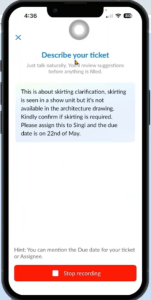
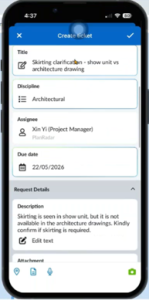
The project manager picks up the RFI, adds the original drawing and the cost and time impact, and attaches a 360-degree SiteView capture of the location so a remote reviewer can see the actual site condition. The architect reviews it with that context, replies with a revised detail, signs the response, and the ticket locks so it cannot be quietly altered afterwards.
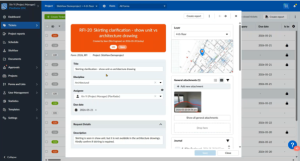
From the same RFI, the project manager initiates a change order, links it back to the original request, attaches the bill of quantities and cost calculation, and sends it through a preset approval workflow. Where a bill of quantities runs long, AI reads through the document on request, answering questions like “is skirting mentioned in this document” so the reviewer does not have to scan the whole file manually. The developer sees it waiting under “pending your approval,” reviews the full history in one place, and approves in a single click. The change order status updates across the project, and its value flows into the project statistics.
Watch the full workflow in the on-demand recording, to see it run end to end.
Questions from the audience
How can construction teams speed up approvals when several stakeholders are involved?
The fastest route is to define approval workflows in advance rather than assembling them each time a request comes up. Teams can preset separate workflows for variation orders, submittals (such as method statements) and handovers, naming the people who need to review and sign at each step. When a form is created, the right workflow is applied in a couple of clicks, and each reviewer approves from a mobile or desktop screen with the full ticket history, attachments and context already in front of them. Nothing has to be chased through email, and everyone can see whose turn it is at any moment.
How can you spot small project changes before they become big budget and timeline problems?
Put someone with the right judgement in front of the change at the very start, before a minor item quietly grows into a cost and schedule problem. The practical obstacle is that experienced people are usually the busiest, so the question is how to free their time. One customer sat with an employee and a stopwatch to measure where the hours actually went, and found a large share spent on non-value-adding work such as searching for documents and tracking information across emails. Removing that low-value work lets experienced reviewers apply their judgement early, which is where it has the most effect on the eventual cost.
How can construction teams cut admin work when site information is scattered across WhatsApp, email and spreadsheets?
Keep the on-site habits people already have and change only where the information lands. Teams naturally take a photo on their phone and send a quick message when they spot something, then spend time later compiling it into spreadsheets and emails and tracking it across channels. Submitting that same photo and voice note straight into a single ticket, with a journal that records every action and doubles as a chat thread, keeps the behaviour familiar while removing the later compiling and chasing. This connects directly to the finding that nearly 8 in 10 respondents say most of their documentation lives across unconsolidated channels.
Webinar resources: recording, slides and full report
Watch the on-demand recording: the full survey walkthrough and live demo.
Download the webinar slides: the data charts to share with your team.
Read the full industry report: Managing Project Changes in the Age of AI.


