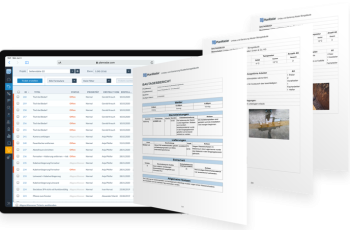
A work inspection request in construction, commonly known as a WIR, is one of the main control points used to verify that completed work meets the project’s quality requirements before the next activity begins.
However, a WIR should not be treated as another administrative form.
For site managers, QA/QC teams, contractors and consultants, it is a formal quality gate. It confirms that the contractor has checked the work, the required supporting information is available, and the activity is ready for an authorised inspection.
When the process is managed properly, WIRs help protect construction quality, maintain the correct work sequence and create a traceable record of every inspection decision.
When it is poorly managed, the same process can cause rejected inspections, repeated work, delayed follow-on activities and constant chasing between project stakeholders.
This guide explains how the WIR process works, why requests are commonly rejected and how digital platforms can help project teams manage inspections more consistently.

What is a work inspection request in construction?
A work inspection request is a formal submission raised by a contractor to inform the consultant, supervising engineer or authorised inspector that a specific construction activity is complete and ready for inspection.
Depending on the project, it may also be called an inspection request, request for inspection or request for work inspection.
A typical WIR identifies:
- The work that has been completed
- The exact inspection location
- The relevant drawings and specifications
- The applicable method statement
- The Inspection and Test Plan reference
- The inspection checklist
- The requested inspection date and time
- Supporting photographs and test records
- The contractor or subcontractor responsible for the work
The specific format, terminology and approval statuses may differ between projects. Therefore, the WIR process should always follow the project quality plan, contract requirements and agreed approval procedures.
Most importantly, submitting a WIR should confirm that the contractor has already inspected the work internally. The consultant’s inspection should not be the first quality check.
Why WIRs matter to construction quality and progress
WIR is not only a quality record. It also affects programme control, trade coordination and the ability to release work safely to the next stage.
WIRs protect construction quality
Many construction activities must be inspected before they are covered, enclosed or followed by another trade.
For example:
- Reinforcement should be inspected before concrete is poured.
- Waterproofing should be checked before protection layers or finishes are installed.
- Concealed mechanical and electrical services should be inspected before ceilings or walls are closed.
- Substrates should be checked before tiling, coating or finishing begins.
- Underground services should be inspected before backfilling.
These inspections provide an opportunity to identify defects or non-compliant work while correction is still practical.
WIRs protect the construction sequence
A delayed or rejected inspection can affect several connected activities.
For instance, an unapproved reinforcement inspection may delay a concrete pour. That delay may then affect labour, equipment, concrete supply, subsequent structural activities and the wider programme.
Therefore, inspection planning should form part of daily site coordination and short-term look-ahead planning.
WIRs create accountability
A properly managed work inspection request records:
- Who prepared and submitted the request
- When the request was submitted
- Which documents were provided
- Who inspected the work
- When the inspection took place
- What comments were recorded
- Whether the work was approved or rejected
- Who was responsible for corrective action
- When the final approval was issued
This record helps reduce uncertainty about decisions and responsibilities.
WIRs support audits and handover
Approved inspection records can later support quality audits, testing and commissioning, handover documentation and reviews of completed work.
The Chartered Institute of Building’s Code of Quality Management also highlights the role of inspection checklists, inspection reports and controlled quality documentation within construction quality management.
The typical work inspection request workflow
Although project procedures vary, an effective WIR workflow normally follows eight main stages.
1. Complete the construction activity
The contractor or subcontractor completes the work in accordance with the latest approved drawings, specifications, method statement and approved materials.
Before moving forward, the responsible site engineer should confirm that the activity is complete and that the inspection area is accessible and safe.
2. Conduct the contractor’s internal inspection
The contractor’s site and QA/QC teams should inspect the work before submitting it to the consultant.
Depending on the activity, the internal check may include:
- Dimensions and levels
- Alignment and positioning
- Material verification
- Installation quality
- Drawing compliance
- Checklist completion
- Test results
- Workmanship
- Cleanliness and access
- Closure of previous comments
This stage is critical. Raising a WIR before the work is ready wastes inspection time and increases the likelihood of rejection.
3. Prepare the WIR submission
The contractor prepares the request and attaches the information required by the project procedure.
A complete submission should allow the reviewer to understand exactly what must be inspected, where it is located and which acceptance requirements apply.
4. Submit the request to the authorised reviewer
The WIR is submitted to the consultant, resident engineer, inspector or other authorised reviewer.
The contractor should respect the agreed notice period. Submitting requests too late can make it difficult for the consultant to plan resources and may delay the work.
5. Conduct the site inspection
The reviewer visits the specified location and checks the work against the approved documents, checklist and acceptance criteria.
The contractor’s responsible site or QA/QC representative should normally be available to provide access, clarify the work and respond to technical questions.
6. Record the inspection decision
The inspector records the result using the statuses defined for the project.
These may include:
- Approved
- Approved with comments
- Rejected
- Resubmission required
- Work not ready
- Inspection cancelled
The meaning of each status should be clearly defined. For example, the project team should agree whether “approved with comments” allows the next activity to proceed or requires comments to be closed first.
7. Complete corrective action
When work is rejected, the contractor should review each comment, correct the identified issues and provide updated evidence.
The resubmission should show what was changed. It should not simply return the same request without clear corrective-action evidence.
8. Reinspect, close and retain the record
Once the corrections are complete, the work is reinspected where required.
After approval, the WIR and its supporting information should remain available as part of the project quality record.
The final record may later support:
- Quality audits
- Progress verification
- Testing and commissioning
- Handover files
- As-built documentation
- Claims reviews
- Dispute resolution
What should a complete WIR include?
A work inspection request should contain enough information to support an efficient inspection without requiring the reviewer to search through separate emails, folders or message threads.
A complete submission will usually include:
- Project name
- WIR reference number
- Discipline or work package
- Clear activity description
- Exact building, floor, room, zone or grid location
- Contractor and subcontractor details
- Requested inspection date and time
- Approved drawing references
- Specification references
- Approved method statement reference
- Inspection and Test Plan reference
- Completed inspection checklist
- Relevant material approval references
- Supporting site photographs
- Test results or certificates, where applicable
- Previous WIR reference for a resubmission
- Evidence showing that previous comments were corrected
Mandatory requirements should be agreed during project mobilisation and reflected in the WIR form.
Common reasons WIRs are rejected: Rejected WIRs do not always mean that the construction activity is fundamentally defective. In many cases, rejection results from poor readiness, incomplete information or weak internal control.
The work is incomplete: The inspection may be requested while parts of the activity are unfinished, inaccessible or not prepared for review.
The contractor’s internal inspection was insufficient: Visible issues that should have been identified by the contractor remain unresolved when the consultant arrives.
The wrong drawing revision was used: The completed work may be based on an outdated or superseded drawing.
References or attachments are missing: The reviewer may not have the required checklist, method statement, drawing, test result or material approval.
The location is unclear: Descriptions such as “first-floor works” are not precise enough for large or complex projects.
Previous comments remain open: A resubmission may be raised without showing how the earlier rejection comments were addressed.
The work does not meet the acceptance requirements: The installation may not comply with the approved drawings, project specifications, method statement, tolerances or workmanship standards.
The request was submitted too late: Late submissions can affect inspection planning and place unnecessary pressure on both contractor and consultant teams.
Where traditional WIR processes commonly fail
Many construction projects still manage WIRs through a combination of paper forms, spreadsheets, email attachments, shared folders and messaging applications.
Although each tool may serve a purpose, the overall process becomes difficult to control when information is spread across several channels.
There is no single source of truth
The site team, document controller and consultant may hold different versions of the same request or register.
As a result, teams may disagree about whether a WIR is submitted, under review, rejected or closed.
Status visibility is limited
Site managers may not have a current view of all pending inspections and overdue decisions.
They often depend on manually updated spreadsheets or individual follow-up with the document-control team.
Follow-up becomes time-consuming
Engineers spend valuable time calling, emailing and messaging reviewers to confirm inspection dates and decisions.
Supporting evidence becomes disconnected
Photographs may be stored on mobile phones, drawings in a document-management system, comments in emails and status information in a spreadsheet.
This makes the complete inspection history difficult to retrieve.
Reporting is delayed
Management may struggle to answer basic operational questions such as:
- How many WIRs are awaiting inspection?
- Which requests are overdue?
- Which activities have the highest rejection rate?
- Which subcontractors require repeated reinspections?
- How long does the average approval take?
- Which project areas are creating quality delays?
Accountability becomes unclear
When comments, instructions and decisions are communicated informally, it may be difficult to establish who was expected to act next and when the action was due.
How digital platforms improve the WIR workflow
A digital platform should do more than convert a paper form into an electronic document.
Its main value is connecting the request, location, supporting evidence, workflow status, responsible parties and final decision within one controlled process.
Standardised digital WIR forms
Project teams can create a structured form with mandatory fields, dropdown lists, date fields, references and required attachments.
This improves consistency and reduces incomplete submissions.
It also allows the same agreed process to be applied across project areas, contractors and work packages.
Mobile submission from the construction site
Site engineers and QA/QC teams can prepare or update requests while standing at the work location.
They can capture current photographs and add relevant information without returning to the site office or entering the same information into several systems.
Clear responsibilities and workflow stages
A digital WIR can move through predefined stages such as:
Draft → Contractor QA/QC review → Submitted → Inspection scheduled → Approved or rejected → Corrective action → Resubmitted → Closed
Each stage can be linked to the responsible person or organisation.
This makes it easier to see who must act next.
Location-based inspection records
The WIR can be connected to a specific floor, room, zone, asset or position on a digital plan.
This helps the inspector locate the work and enables management to analyse inspection activity by project area.
Centralised supporting information
Photographs, drawings, checklists, comments and corrective-action evidence can remain attached to the same inspection record.
This creates a clearer history from the first submission to final approval.
Notifications and due dates
The relevant reviewer can be notified when a request is submitted. Similarly, the contractor can receive an update when the inspector records a decision or requests corrective action.
Due dates and reminders can support timely follow-up without depending entirely on manual chasing.
Real-time reporting
Digital dashboards can give project managers a current view of WIR volume, status, ageing and performance.
Rather than waiting for a manually prepared weekly register, managers can identify delayed inspections and recurring rejection patterns earlier.
Better project records
When information is captured consistently throughout construction, approved WIRs and supporting evidence are easier to retrieve during audits, handover and final documentation.
How PlanRadar supports work inspection request management
PlanRadar provides a central digital platform through which contractors, consultants, developers and project teams can configure and manage their construction workflows.
For WIR management, teams can create digital forms that capture information such as:
- Activity and work-package details
- Inspection location
- Drawing and specification references
- Inspection dates
- Checklists
- Photographs
- Documents
- Comments
- Approval decisions
- Corrective actions
Each request can be assigned to the appropriate person and moved through a predefined approval workflow based on the project’s agreed responsibilities.
For example:
Contractor site engineer → Contractor QA/QC review → Consultant inspection → Approval or rejection → Contractor correction → Consultant reinspection → Closure
PlanRadar can support this process through:
- Custom digital forms
- Mobile site documentation
- Plan-based location marking
- Photo and document attachments
- Custom workflow statuses
- Role-based responsibilities
- Notifications and due dates
- Communication history
- Dashboard visibility
- Custom reports
- Exportable inspection records
The objective is not simply to replace a paper WIR with a digital form.
The greater benefit is giving site teams, QA/QC personnel, consultants and management access to one connected record showing the work, its location, its evidence, its current status and its complete approval history.
Learn more about how structured construction workflows support better site management.
Practical example: Reinforcement inspection before concrete pouring
Consider a reinforcement inspection for a structural concrete element.
First, the subcontractor completes the reinforcement installation according to the approved structural drawing and method statement.
The contractor’s site engineer then checks that the work is complete. After that, the QA/QC engineer verifies the reinforcement size, spacing, laps, cover, openings, cleanliness and other relevant checklist requirements.
Once the internal review is complete, the QA/QC engineer creates the WIR. The request includes the exact location, drawing reference, completed checklist and current site photographs.
The consultant receives the request and visits the specified location.
During the inspection, the consultant identifies an incorrect lap length in one area and rejects the request with a clear location reference and comment.
The contractor corrects the reinforcement and adds updated photographs to the same inspection record. The request is then resubmitted.
After reinspection, the consultant approves the work, allowing the concrete pour to proceed.
In a connected digital workflow, the original submission, rejection comment, corrective evidence, resubmission and final approval remain within one record. This gives the project team a complete inspection history without relying on separate email chains or manually assembled files.
Best practices for managing WIRs effectively
Complete the internal inspection first
The contractor should never use the consultant’s inspection as a substitute for its own quality-control process.
Make critical information mandatory
The WIR should not be submitted without the correct location, activity description, drawing reference, checklist and required evidence.
Agree on clear status definitions
Every stakeholder should understand what each approval status means and whether the next activity is permitted to proceed.
Define submission notice and response periods
The project quality procedure should specify how much notice is required and the expected time for inspection or response.
Keep inspection comments specific
Comments should identify the issue, its location and the required corrective action.
General comments such as “rectify the work” provide limited direction and may create further review cycles.
Connect inspections with site planning
WIR requirements should be considered during daily coordination and look-ahead planning, particularly for hold points and work that will become concealed.
Analyse recurring rejection causes
Repeated rejection should be treated as management information.
It may point to:
- Weak contractor supervision
- Poor subcontractor performance
- Incomplete drawings
- Misunderstood specifications
- Inadequate method statements
- Material problems
- Insufficient quality briefings
Maintain one controlled inspection record
Supporting information, comments, decisions and corrective evidence should remain connected to the WIR throughout its lifecycle.
WIR metrics construction managers should monitor
Counting completed inspections alone provides limited insight.
Senior project teams should monitor a focused set of performance indicators, including:
- Total WIRs submitted
- WIRs awaiting inspection
- Approved WIRs
- Rejected WIRs
- First-time approval rate
- Average inspection response time
- Average time to close rejected work
- Number of overdue WIRs
- Number of reinspections
- Rejection reasons by category
- Performance by subcontractor
- Performance by discipline
- Performance by project area
- Consultant response time
- Inspection volume against planned activities
First-time approval rate is particularly useful because it indicates whether work is being completed and internally checked to the required standard before submission.
However, metrics should be interpreted in context. A high approval rate is only valuable when inspections remain thorough and the required quality standards are consistently applied.
Treat the WIR as a quality gate, not an administrative form
A work inspection request in construction is a key part of site quality control and coordination.
When managed correctly, it confirms that work is ready for review, supports formal approval, protects the construction sequence and creates a reliable quality record.
However, the process becomes harder to control when requests, drawings, photographs, comments and decisions are spread across paper forms, spreadsheets, emails and informal messages.
Digital platforms provide a more structured approach. They connect forms, locations, evidence, responsibilities, statuses and reports within one workflow.
With a platform such as PlanRadar, project teams can manage WIRs more consistently, improve inspection visibility, reduce manual follow-up and retain a complete record from initial submission through correction and final approval.
Manage WIRs through one connected digital workflow
Standardise inspection requests, connect them to plans and site locations, track approvals and keep the complete inspection history available in one platform.