
TL;DR – The 5 Best Fire Safety Management Apps
Top pick: PlanRadar, the easiest-to-use on-site fire inspection app, that delivers full NFPA compliance, on-plan issue tracking and report-ready documentation in one platform.
- PlanRadar: Best overall, the easiest-to-use fire app, with fire-specific surveys and NFPA compliant reporting in one place
- SafetyCulture: A general inspection-checklist app used across many industries, not fire-specific
- Inspect Point: Aimed at fire protection contractors who schedule and bill for recurring inspections
- GoCanvas: Best if you mainly want to turn paper forms into digital ones
- Form.com: Built for large enterprises with complex, multi-site reporting
Need a reliable way to run fire inspections, track risks and stay compliant? This guide compares five top-rated fire inspection apps that help teams document hazards, complete mobile inspections and generate professional reports. Whether you want a mobile fire inspection app for daily use in the field or a fire safety risk assessment app that aligns with standards like NFPA and OSHA, the right choice comes down to how quickly your team can actually use it in the field, how cleanly it produces a compliant record improving safety and streamlining workflows. On all counts, PlanRadar is our top recommendation.

Product Comparison: The Best Fire Inspection Apps 2026
The table below compares five leading fire inspection apps on what they are best for, their core features, platform availability and pricing. Whether you’re focused on daily inspections, NFPA compliance, or enterprise-level reporting, this overview helps you identify the best match for your needs.
Please note: all information here is based on publicly available sources and may change. We recommend verifying current features, pricing and compliance capabilities directly with each vendor.
| App | Best For | Key Features | Platforms | Pricing |
| PlanRadar | Easiest to use in the field; one fire app for site surveys and compliance reporting | NFPA compliance, on-plan deficiencies tracking, mobile inspections, peer review and sign-off, reports in seconds, QR/NFC tags, AI capture & reporting | iOS, Android, Web | From $35/user/mo (Basic); Starter, Pro and Enterprise tiers |
| SafetyCulture | Mobile-first routine inspections and checklists | Smart checklists, hazard reports, offline mode | iOS, Android, Web | Free; Premium $24/mo; Enterprise custom |
| Inspect Point | Fire protection contractors billing for inspections | NFPA templates, offline sync, invoicing | iOS, Android, Web | Silver, Gold, Platinum (on request) |
| GoCanvas | Replacing paper forms with digital ones | Drag-and-drop forms, barcode/GPS, integrations | iOS, Android, Web | Pro $49 – Max $79/mo |
| Form.com | Enterprise inspections with complex reporting | Escalation logic, offline support, audit trails | iOS, Android, Web | Custom |
1. PlanRadar: Best overall
PlanRadar is the easiest-to-use fire inspection app for teams that work in the field. One app for inspections and reporting, all in one place. Most teams onboard in about ten minutes, subcontractors and stakeholders are free to add, and the apps work offline on every device, so an inspection never stops because the signal does. That ease of use is the reason most customers pick it: 75% chose PlanRadar for ease of use, and 91% of subcontractors say it is easy to use. It is the top choice for fire safety teams that need something their whole crew will actually adopt.
PlanRadar pairs that ease of use with full compliance capability. It is one platform to digitally manage fire safety and NFPA compliance, with forms that map to NFPA 72/80/25 and local AHJ requirements. The platform adapts to the latest codes and regulations, so when a standard changes you update your own forms in minutes and keep working. Every action carries a time-stamped, tamper-proof audit trail, the kind of record AHJs and clients expect to see.
The platform covers the full range of fire inspection work: fire risk assessments, fire door inspections, extinguisher, alarm and sprinkler checks, passive fire protection and compartmentation surveys, and recurring maintenance inspections. Deficiencies and findings are logged directly on the floor plan with photos, notes and voice memos, assigned to the right person with a deadline, and tracked through to sign-off. QR codes and NFC tags placed around a site pull up the relevant fire documentation in seconds when scanned.
Reporting is where the time savings land. Fully flexible reports are ready in seconds and export to PDF or Excel, so teams cut post-site reporting time by more than half and spend more days in the field instead of writing things up. AI features speed this up further: capture observations by voice and have them turned into a structured record of deficiencies and findings while you keep working, generate a written project summary from recent activity, and get instant answers on how to run a workflow. All of it stays inside PlanRadar’s secure environment rather than a third-party AI tool. Learn more on the PlanRadar AI page.
For visual evidence, SiteView lets an inspector walk a site with a 360° camera and automatically maps the imagery onto the 2D plan. You can look “behind the wall” at what was installed, compare two dates side by side to spot changes, and build a complete visual record of fire-stopping and concealed services without taking thousands of separate photos. It is a fast way to document hard-to-reach passive fire protection.
PlanRadar holds ISO 27001 certification and is an NFPA member
🔧 Best For
Fire safety teams that want the easiest-to-use inspection app in the field, that adapts to their workflows, without giving up NFPA-grade rigor.
📌 Key Features
- Mobile fire inspections logged on digital floor plans, with photos, notes and voice memos
- Forms that map to NFPA 72/80/25 and local AHJ requirements
- Fully flexible reports, client-ready in seconds, exportable to PDF or Excel
- QR/NFC tag scanning for asset-based and recurring inspections
- Task assignment, deadlines and progress tracking with a tamper-proof audit trail
- AI voice capture to record deficiencies and findings and AI project summaries
- SiteView 360° reality capture for visual documentation
- Free subcontractor and stakeholder access; offline mode on iOS, Android, Windows and web
💻 Platforms
iOS, Android, Web
💲 Pricing
- 30-day free trial
- Basic – $32/user/month
- Starter – $107/user/month
- Pro – $159/user/month
- Enterprise – Custom pricing
- Confirm current pricing on the pricing page.
📎 Links & Downloads
🧐 Selector Tip
Choose PlanRadar if you want the easiest-to-use fire inspection app that is still fully NFPA-compliant, with on-plan tracking and client-ready reports in seconds.

PlanRadar offers FCS efficiencies, transparency and the Golden Thread of Information which provides a greater quality of service provided to clients
Learn more about how PlanRadar can help you streamline fire safety inspections, and book a free product demo or compare prices for your business.
2. SafetyCulture (iAuditor)
SafetyCulture (formerly iAuditor) is a fire safety management app designed to help teams carry out inspections, document risks, and ensure compliance with fire safety standards. The platform is optimized for use in the field, offering straightforward tools for daily walkthroughs, audits, and task tracking.
The app is especially useful for teams that need offline functionality, photo documentation, and clear reporting. Built-in templates and standardized processes support routine inspections as well as more formal fire safety risk assessments across various industries.
🔧 Best For
Teams seeking mobile-first inspections, risk tracking, and customizable safety workflows.
📌Key Features
- Customizable checklists with smart logic and conditional workflows
- Hazard and incident reporting with photo/video capture
- Asset tracking, QR code scans, and digital signatures
- Flexible analytics dashboards and auto-generated reports
- Offline functionality, multi-language support, and role-based access
💻 Platforms
iOS, Android, Web
💲 Pricing
- Free – Up to 10 users
- Premium – $24/seat/month (unlimited templates, advanced features)
- Enterprise – Custom pricing and integrations
⭐User Rating
4.6/5 (G2, Capterra, GetApp)
📎 Links & Downloads
🧐 Selector Tip
Choose SafetyCulture if you need a proven solution for conducting fire safety inspections and generating clear, actionable reports—especially when working across multiple sites.
3. Inspect Point
Inspect Point is a mobile fire safety inspection app designed for fire protection contractors and inspection teams. It comes with preloaded NFPA and UL-C templates, making it a strong choice for organizations that need to ensure regulatory compliance and generate detailed, professional reports with minimal setup.
Inspect Point enables field teams to complete inspections offline, capture photos, record deficiencies, and automatically sync data once connected. It also supports invoicing, proposals, and scheduling, making it a full-service solution for businesses that handle both inspection and follow-up services.
🔧 Best For
Fire protection contractors needing NFPA-compliant templates, offline inspections, and built-in business tools.
📌 Key Features
- Pre-built NFPA/UL-C inspection templates
- Offline inspection capability with auto-sync
- Deficiency tracking with photo capture
- Work orders, invoicing, and proposal generation
- Technician scheduling and asset management
💻 Platforms
iOS, Android, Web
💲 Pricing
- Tiered plans: Silver, Gold, Platinum (pricing on request)
⭐ User Rating
4.4/5 (Capterra, Software Advice)
📎 Links & Downloads
🧐 Selector Tip
Choose Inspect Point if you need NFPA-aligned inspections, offline mobile workflows, and integrated follow-up tools like proposals and invoicing.
4. GoCanvas
GoCanvas is a general-purpose mobile forms platform for teams transitioning away from paper-based inspections. It enables users to create custom digital forms for fire safety checks, incident reports, and risk assessments—complete with signatures, photos, and GPS stamps.
Used as a fire safety risk assessment app, GoCanvas offers fast field data collection, cloud storage, and automated report generation. While it’s not tailored specifically to fire codes, its flexibility makes it a solid option for organizations with unique internal processes or mixed safety requirements.
🔧 Best For
Teams replacing paper-based inspections with mobile forms and automated reporting.
📌 Key Features
- Customizable inspection forms with drag-and-drop builder
- Photo capture, barcode scanning, GPS, and signature fields
- Automated PDF report generation and cloud storage
- Task scheduling and workflow management
- Integrations with Excel, Dropbox, Salesforce, and more
💻 Platforms
iOS, Android, Web
💲 Pricing
- Pro – $49/user/month
- Max – $79/user/month
⭐ User Rating
4.4/5 (App Stores, Capterra, G2)
📎 Links & Downloads
🧐 Selector Tip
Choose GoCanvas if you’re moving from paper checklists to digital forms and need fast, customizable documentation tools with strong integration options.
5. Form.com
Form.com is a platform designed for large organizations with complex inspection, compliance, or asset tracking needs. It allows companies to build deeply customized forms, workflows, and reporting logic that fit internal fire safety protocols, regulatory requirements, or site-specific needs.
Used as a mobile fire safety inspection app, Form.com is well-suited for multi-site enterprises that require robust data validation, escalation logic, and audit trails. It’s trusted across industries like manufacturing, healthcare, logistics, and critical infrastructure.
🔧 Best For
Large enterprises needing tailored fire safety inspection workflows, advanced reporting, and regulatory alignment.
📌 Key Features
- Fully customizable inspection forms with advanced logic
- Conditional workflows and automated escalation paths
- Offline inspection support and mobile syncing
- Role-based access, digital sign-offs, and audit trails
- Enterprise integrations (ERP, EHS, document management systems)
💻 Platforms
iOS, Android, Web
💲 Pricing
- Custom pricing based on scale, features, and integrations
⭐ User Rating
3.4/5 (App Stores, Capterra)
📎 Links & Downloads
🧐 Selector Tip
Choose Form.com if you need a scalable, enterprise-grade solution for managing fire safety inspections, with advanced reporting, offline access, and strong auditability across multiple locations.
Requently Asked Questions
What should I look for when selecting a fire safety management app?
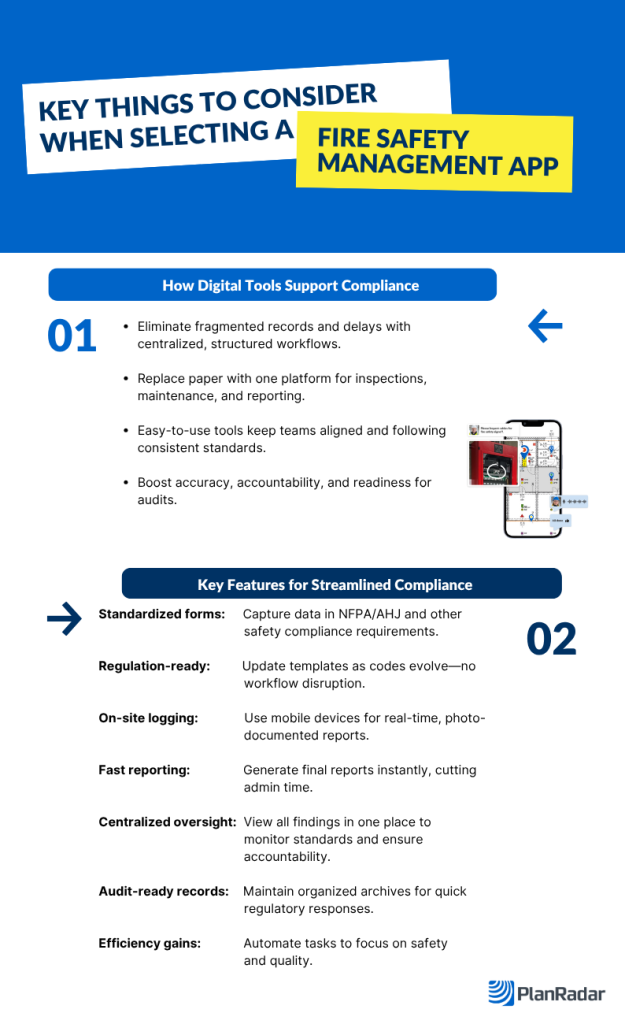
Look for features that match your daily workflow: forms you can configure to your codes, offline functionality, photo documentation and fast reporting. If your team follows NFPA or OSHA guidelines, confirm the app supports those standards through configurable templates and compliance-ready exports. Ease of use matters as much as the feature list, because an app the field team avoids will not produce a reliable record.
This infographic lists up the key things you should consider when selecting a fire safety management app.
What is the best fire inspection app?
PlanRadar is the best fire inspection app for most teams. It combines forms that map to NFPA codes with on-plan deficiency tracking and AI-assisted reporting, so survey are completed in the field and the compliant record is ready in seconds. It is also the easiest of the leading options to roll out, which is why most teams actually adopt it.
What are the best fire safety apps?
PlanRadar is our top pick, with the best balance of ease of use, NFPA-ready forms and fast reporting. SafetyCulture is a capable mobile-first checklist tool, Inspect Point suits fire protection contractors who also need invoicing, GoCanvas helps teams digitize paper forms, and Form.com fits large enterprises with complex reporting. The right one depends on whether you need a dedicated fire platform or a general forms tool.
What is the easiest-to-use fire inspection app?
PlanRadar is the easiest fire inspection app to use in the field. Most teams onboard in about ten minutes, subcontractors and stakeholders are free to add, and the apps work offline on every device. That ease of use is measurable: 75% of customers chose PlanRadar for ease of use and 91% of subcontractors say it is easy to use.
What is the best field inspection app?
For fire and building inspections, PlanRadar is the best field inspection app. It is built for on-site work, with offline access, on-plan tracking, photo and voice capture, and reports generated in the field rather than back at the office. Teams cut post-site reporting time by more than half.
What is the best fire door inspection software?
PlanRadar works well for fire door inspections, with checklists that map to NFPA 80, on-plan tracking and fast reporting. For a deeper look at choosing the right tool and at the compliance side, see our guides on picking a fire door inspection app and on fire door inspections.
Are Digital Fire Safety Inspections Recognized by Authorities?
Yes. Regulatory and industry bodies increasingly support digital inspection and documentation methods. For example:
✅ NFPA 915 provides standards for remote and digital inspections.
✅OSHA accepts digital recordkeeping as long as audit trails are maintained.
✅ NFPA LiNK offers digital access to 1,400+ fire safety codes.
✅ Local AHJs and The Joint Commission now routinely accept electronic inspection reports.
To ensure compliance, digital tools should include time-stamped logs, secure backups, and exportable reports.
Which fire inspection app is best for NFPA compliance?
PlanRadar is the strongest all-round choice for NFPA compliance. Its forms can be configured to NFPA 72, 80 and 25 and to local AHJ requirements, and the platform adapts as codes change rather than waiting on a vendor update. Every inspection carries a time-stamped, tamper-proof audit trail that AHJs and clients can rely on.
Can these fire safety inspection apps replace paper entirely?
In most cases, yes. A fire inspection app can handle data collection, signatures, compliance reporting and task tracking end to end. Some organizations keep paper backups for legal or procedural reasons, but the working record lives in the app.
Are free or low-cost fire inspection apps suitable for serious inspections?
Free tools can be fine for basic checks or a trial, but they often lack the reporting, backups and multi-user controls that regulated inspections need. For compliance-grade work, a paid platform is more reliable. A practical middle ground is a platform with a free trial and free subcontractor access, such as PlanRadar, so you can test it properly and bring your whole team in without per-seat costs for collaborators.


