
TL;DR – The Best Construction Management Software Tools
Top pick: PlanRadar, the easiest-to-use field management platform that delivers jobsite documentation, defect tracking, and inspection-ready reporting in one integrated platform.
- PlanRadar: Best overall for jobsite documentation, defect tracking, and compliance-ready inspection reporting
- Procore: Enterprise all-in-one built for large general contractors managing financials and field operations at scale
- Buildertrend: Ideal for residential builders needing scheduling, client selections, and a homeowner portal
- Contractor Foreman: The budget-friendly choice for small GCs, with transparent pricing from $49/month
- Fieldwire: Best for field task management on small crews, with strong offline capabilities and a genuine free tier
Shopping for construction software means sorting through dozens of tools, and every “best” list meant to help, ranks whichever one pays the most. Pricing hides behind “contact sales,” feature tables show fifteen green checkmarks that mean nothing, and somehow every product is #1 at everything. But there’s no single best construction tool, only the best fit for your size, your projects, and the work your team actually does on-site.
We make PlanRadar, and we’re not going to tell you we’re the best at everything. We’re best at a specific thing: easiest-to-use platform for jobsite processes and reports. For the rest of this list we’ll point you to whoever genuinely wins your situation, whether that’s Procore for enterprise financials or Bluebeam Revu for plan markups.
We judged all 15 tools on four things that actually matter when you’re buying: the real starting price, treating hidden pricing as the downside it is; how usable the tool is in the field; the core work each tool is built to do; and what contractors actually say about it on G2 and Reddit. If a tool is clunky, overpriced, or hides its price, we say so.
Comparison: The Best Construction Management Software 2026
| Tool | Best for | Starting price | Free trial/tier | G2 rating | Standout strength |
| PlanRadar | Field crews wanting an all-in-one field management platform | ~$35/user/mo Unlimited free subs & watchers on every plan | 30-day free trial | 4.5 (72) | Defects & tasks on plans, inspections, reporting |
| Procore | Large and enterprise GCs needing all-in-one financials and field | Custom / contact sales Unlimited users, but all on one paid contract | Free trial | 4.6 (4,219) | Budgets, commitments, RFIs, submittals, drawings, reporting |
| Autodesk Forma (Build) | BIM-heavy teams taking designs from model to field | ~$45/user/mo | Free trial | 4.4 (5,385) | Clash detection, RFIs, submittals, Revit sync |
| Fieldwire | Field crews managing plans, tasks and punch lists on-site | Free tier; Pro $39/user/mo | Free tier + trial | 4.5 (584) | Tasks, punch lists, inspections, daily reports |
| Buildertrend | Custom home builders and remodelers who want a client portal | Custom / contact sales Free subs & clients | 30-day risk-free (no true trial) | 4.3 (229) | Scheduling, selections, job costing, client portal |
| Bluebeam Revu | Estimators and architects doing PDF takeoffs and markups | $260/user/yr Free external reviewers via Studio/web | Free trial | 4.5 (461) | PDF markup, measurement/takeoffs, Studio collaboration |
| Raken | Field crews capturing daily reports and safety records | Custom / contact sales | Free trial | 4.6 (109) | Digital daily reports, time tracking, safety checklists |
| Contractor Foreman | Small GCs wanting a full, low-cost all-in-one suite | $49/mo (annual) | Free trial | 4.5 (380) | Estimates, scheduling, job costing, daily logs, RFIs |
| JobTread | Residential and remodel builders wanting flat-rate all-in-one | $159/mo flat (annual) Free subs, vendors & customers | Demo (no free trial) | 5.0 (97) | Budget-first estimating, proposals, scheduling, CRM, client portal |
| Oracle Aconex | Large and infrastructure projects needing document control at scale | Custom / contact sales | None | 4.5 (231) | Document control, correspondence, workflows, tenders |
| Knowify | Trade and specialty subs needing job costing tied to QuickBooks | $99/mo + $29/user | 14-day trial | 4.5 (103) | Job costing, AIA/progress billing, scheduling, QuickBooks sync |
| Houzz Pro | Residential firms that win work on client experience | ~$85/mo Free link-based sub & client access | Free trial | 4.0 (57) | Lead gen, proposals, CRM, invoicing |
| monday.com | Lighter teams wanting a flexible, build-your-own PM tool | Free tier; Basic $9/seat/mo Free viewers/guests on higher tiers | Free tier + trial | 4.7 (16,990) | Custom boards, timelines/Gantt, automations, dashboards |
| Archdesk | Growing UK/EU contractors wanting ERP-style financials and ops | Custom Free subs, clients & consultants | None | 4.3 (21) | Budgeting, procurement, invoicing, scheduling, asset management |
| Jobber | Home-service and trade contractors running dispatch-based work | $49/mo ($29/mo w/ annual prepay) Free client hub | Free trial (no free plan) | 4.6 (517) | Scheduling, dispatch, quoting, invoicing, client CRM |
How we evaluated
We scored every tool on four things that matter when you’re deciding what to buy: the real starting price; how usable it is in the field, meaning whether a crew would actually open it on a phone or tablet; how well it fits the work it’s built for; and verified opinions from users on G2, Capterra, and contractor discussions on Reddit. We checked pricing against several sources in July 2026, and pulled ratings from G2 so the numbers are consistent across tools.
This piece is written and maintained by Ganesh Nair, who works in product marketing at PlanRadar and spends his time close to the people who use construction software day to day. We make one of the tools on this list (PlanRadar), so we’ve deliberately ranked ourselves only where we honestly win, and recommended competitors everywhere else.
Field-workflow capability at a glance
The price table above helps you narrow down your options quickly. If what happens on the jobsite matters most to you, this table is the one to study. When a cell says “Limited,” it means the feature exists, but it isn’t something the tool does especially well.
| Tool | AI features | Offline mode | 360° / photo docs | Native mobile app | BIM / plan viewer |
| PlanRadar | AI form & report builders, AI voice-to-ticket capture, AI project-wide search, plus autonomous AI Agents | Yes | Yes (360°) | Yes | Yes |
| Procore | Procore AI: Copilot assistant, embedded agents, Datagrid document AI | Limited | Yes | Yes | Yes |
| Autodesk Forma | AI Assistant: document Q&A, automated RFI drafting, meeting-data agent | Yes | Yes | Yes | Yes (native BIM) |
| Fieldwire | Field Intelligence (beta): photo auto-tagging, risk flags, submittal review | Yes (strong) | Yes | Yes | Yes |
| Buildertrend | AI customer-support chatbot; little operational AI in the product | Limited | Yes | Yes | No |
| Bluebeam Revu | Smart Review, Smart Overlay & Magic Markups (paid Max tier only) | Yes (desktop) | No | Limited (Cloud) | 2D only |
| Raken | AI photo tagging, daily-report summaries, face-ID clock-in | Yes | Yes | Yes | No |
| Contractor Foreman | Support chatbot only; AI takeoffs via third-party Kreo (not native) | Limited | Yes | Yes | Limited |
| JobTread | No native AI; MCP connector pipes data to your own ChatGPT/Claude | Limited | Yes | Yes | No |
| Oracle Aconex | AI safety analytics, document and audit-trail intelligence | Limited | Yes | Yes | Yes |
| Knowify | None found | Limited | Limited | Yes | No |
| Houzz Pro | AutoMate AI: 3D floor plans, AI proposals and takeoffs | Limited | Yes | Yes | Limited (3D) |
| monday.com | monday AI: assistant blocks, agents, Sidekick (general-purpose, not construction) | No | Limited | Yes | No |
| Archdesk | None (no native AI in the product as of 2026) | Limited | Limited | Yes | Limited (integration) |
| Jobber | Jobber Copilot: AI assistant for home-service operations | Limited | Limited | Yes | No |
Best construction management software by company type
- Best overall for large GCs: Procore. Nothing else matches its financials-plus-field breadth at enterprise scale, and most people you hire will already know it.
- Best for small businesses / small GCs: Contractor Foreman. A genuinely complete suite starting at $49/mo, with pricing you can actually see.
- Best for subcontractors: Knowify. Job costing and progress billing that sync straight to QuickBooks, so your field costs reconcile with your books. (If field coordination is the bottleneck, PlanRadar gives subs and watchers free accounts.)
- Best for field / site documentation: PlanRadar. Punch lists, inspections, and 360° photo records pinned to the plan, captured on-site and synced to a time-stamped audit trail. Built for teams whose bottleneck is the jobsite, not the books.
- Best “free to start” option: Fieldwire (real free tier for small crews) or monday.com (free plan for up to 2 users). Truly free construction software is rare; these are the closest.
- Best for home builders / residential : Buildertrend for established builders, or JobTread if Buildertrend priced you out.
- Best for enterprise : Oracle Aconex. Document control and a defensible audit trail across multi-stakeholder megaprojects.
The 15 construction management platforms
1. PlanRadar: best for field management
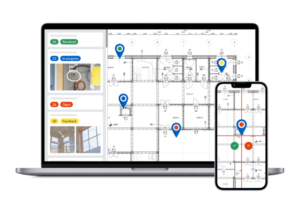
PlanRadar is a field management platform for documentation, reality capture, communication, and reporting in construction projects. The AI-powered platform digitizes all daily processes across real estate and construction projects, enabling teams to enhance quality, cut costs and work more efficiently. PlanRadar gives teams real-time access to critical project data and connects every stakeholder, from contractors and engineers to property managers and owners, with an easy-to-use experience and flexible capabilities for all company sizes and processes.
Who it’s really for: Teams whose bottleneck is the jobsite: capturing defects, running inspections, reporting, and proving what happened. PlanRadar handles the documentation, reality-capture, communication and reporting workflows that field teams live in day to day.
Key features:
- Plan-based field management: track tasks, defects, inspections and field issues directly on digital drawings, with photos, comments, deadlines and assignees.
- Mobile-first field workflows: run quality and safety checks, punch lists, site diaries and handovers from a phone or tablet on site, even offline.
- Custom forms and automated reporting: capture field data to your exact process, code or regulation, and turn it into consistent, ready-to-share reports.
- 360° visual site documentation with SiteView: capture site walks, map imagery to plans, compare progress over time and review conditions remotely.
- RFIs, submittals and change orders: run formal workflows on the same real-time field data, from submission and review through approvals and complete documentation.
Pricing: Published on PlanRadar’s website (rare in this category). Plans start around $35 per user per month.
Free trial / collaborators: 30-day free trial. Unlimited subcontractors and watchers are free on every plan.
| Pros | Cons |
| Genuinely easy for non-technical field crews to adopt. | No built-in financials, estimating or job costing. |
| Fast onboarding without heavy training or implementation. | Less suited to companies looking for a full ERP-style construction platform. |
| Flexible enough to fit different teams, projects and workflows. | Advanced custom workflows may require some initial setup. |
| Strong value for teams focused on field operations and documentation. |
What users say: G2 reviewers consistently single out ease of use and responsive support, and how quickly site data turns into a clean, shareable report.
Verdict: Best for field documentation and reporting, site inspection and defect/punch-list management.
2. Procore: best all-in-one for enterprise GCs
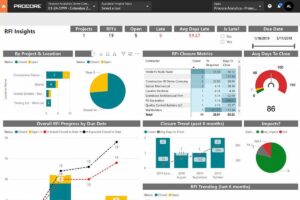
Procore is an all-in-one construction management platform that combines project financials, field operations and quality control in one system for large general contractors.
Who it’s really for: Commercial GCs above roughly $10M in annual volume who want financials, field and quality in one system.
Key features:
- Detailed project finances: budgets, commitments, change orders, and payment applications.
- RFIs, submittals, drawings, quality and safety tracking, and field productivity tools in one platform.
- Unlimited users and a large marketplace of connected business apps.
- Strong reporting and analytics across your entire portfolio of projects.
Pricing: Doesn’t publish a price list, you contact sales for a quote, and that opacity is a real downside. Priced on your Annual Construction Volume rather than user count.
Free trial / collaborators: Free trial available. Unlimited users are included, though everyone sits inside one paid, volume-based contract.
| Pros | Cons |
| Most complete platform for large GCs | Expensive, and price is gated behind sales |
| Unlimited users | Can be more than smaller projects need |
| So widely used that new hires often already know it | Cost rises with your revenue, not your usage |
| Deep financials + field in one system | Users complain most about the financial features |
What users say: On Reddit, Procore is the default benchmark, and one contractor flatly calls it “the best out there”, but smaller GCs repeatedly say it’s overkill, “built for the $10M+ crowd.”
Verdict: Enterprise general contractors who need financials and field in one place and can absorb the price.
3. Autodesk Forma / Build: best for design-to-field & BIM
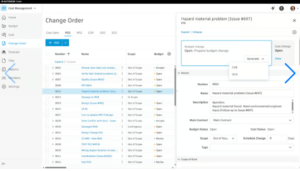
Autodesk Forma (formerly Autodesk Construction Cloud) is a design-to-build platform that connects BIM model coordination with field execution, RFIs, submittals and document control.
Who it’s really for: BIM-heavy teams and firms already in the Autodesk ecosystem. Note: Autodesk Construction Cloud was rebranded to Autodesk Forma in March 2026 (Build is now Forma Build); functionality is unchanged.
Key features:
- Coordinates 3D building models natively and automatically flags clashes.
- Manages RFIs, submittals, sheets and costs, and syncs with Revit in real time.
- Brings the older BIM 360 and PlanGrid tools into a single hub.
- Strong document management with file-version tracking.
Pricing: Autodesk no longer lists prices on its site; you talk to sales for a number. A free trial is available but the real price comes from a salesperson.
Free trial / collaborators: Free trial available; paid per user after that.
| Pros | Cons |
| Some of the best 3D model coordination available | The field tool is the least popular part of the suite |
| Deep Autodesk/Revit integration | Per-user costs add up for large field teams |
| Large body of user reviews | Best only if you already use other Autodesk products |
| Pricing now gated behind sales |
What users say: Reviewers praise model coordination and centralized documents but frequently flag the field/mobile experience as less intuitive than field-first competitors.
Verdict: Design-to-field workflows and BIM-centric projects.
4. Fieldwire: best for field task management
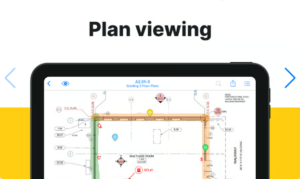
Fieldwire is a jobsite management platform that helps field crews coordinate tasks, track progress and access up-to-date plans on a tablet, even on sites with no signal.
Who it’s really for: Field crews and superintendents who need plans, tasks and punch lists on a tablet, including on sites with no signal.
Key features:
- View plans offline, mark them up, and track versions.
- Task management, punch lists, inspections, and daily reports.
- Photo documentation and 3D building-model viewing.
Pricing: The free Basic plan is genuinely useful. Paid plans, billed yearly, start at $39/user/mo (Pro), $64 (Business), $89 (Business Plus). Any paid plan can be trialed free.
Free trial / collaborators: Genuine free tier (up to 5 users), plus a free trial of the paid plans.
| Pros | Cons |
| Excellent, reliable offline mode | Not built for detailed financial or estimating |
| Clean, easy field app | Per-user cost climbs as the field team grows |
| Transparent pricing incl. a genuine free plan | Fewer integrations than Procore |
| Quick onboarding for teams |
What users say: Contractors describe it as “light Procore”, a lighter, field-focused PM tool, which is high praise for the crews who live in it.
Verdict: Task management and plan coordination, especially as a field layer alongside a heavier back-office system.
5. Buildertrend: best for home builders & remodelers
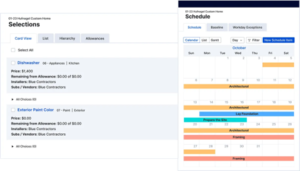
Buildertrend is a residential construction management platform that combines scheduling, client communication and job costing in one system for home builders and remodelers.
Who it’s really for: Custom home builders and remodelers who need scheduling, client communication and job costing in one residential-focused system.
Key features:
- Scheduling, daily logs, homeowner selections, and change orders.
- A homeowner portal you can brand as your own, its biggest strength.
- Job costing and client billing, with QuickBooks and Xero connections.
Pricing: In 2026 Buildertrend switched to custom pricing based on project volume, similar to Procore, you now fill out a form to get a number, a step back from how it used to price.
Free trial / collaborators: 30-day risk-free period (not a true free trial). Subcontractors and clients get free access.
| Pros | Cons |
| Most complete platform for residential builders | Pricing now gated behind sales |
| Great homeowner/client experience | Steep renewal price increases reported |
| Unlimited users | Residential-only, not for commercial |
| QuickBooks sync issues reported |
What users say: A common Reddit summary: “Buildertrend is made for home builders. Procore is made for big GC’s.”
Verdict: Residential builders and remodelers who want an all-in-one and value the client portal.
6. Bluebeam Revu: best for takeoffs & document markup
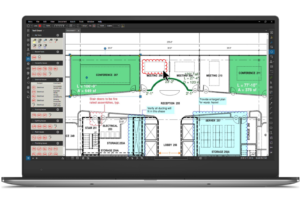
Bluebeam Revu is a document collaboration tool that provides the industry-standard toolset for PDF markups, measurements and takeoffs in construction.
Who it’s really for: Estimators, architects and anyone whose day is PDF drawings: markups, takeoffs and document collaboration. A specialist, not a full PM platform.
Key features:
- Industry-standard tools for marking up PDFs and measuring takeoffs.
- Real-time document review through Studio sessions.
- Higher tiers add CAD plug-ins, drawing comparison, and batch processing.
- A new AI-powered Max tier (May 2026) reviews drawings automatically.
Pricing: Subscription-only now: $260/user/yr (Basics), $330 (Core), $440 (Complete), ~$590 (Max). Free trial available.
Free trial / collaborators: Free trial available; per-seat after that. External reviewers can view and mark up free via Studio/web.
| Pros | Cons |
| Industry standard for takeoffs & drawing markup | Windows-first; Mac only gets cloud/browser, no native app |
| Deep, mature toolset | Subscription-only (no perpetual licence) |
| Transparent pricing | A markup tool, not a PM system |
What users say: Reviewers love the markup experience; the near-universal complaint is the shift from a one-time purchase to an annual subscription.
Verdict: Takeoffs, markups and document collaboration, used alongside a PM platform, not instead of one.
7. Raken: best for daily reports & field data capture
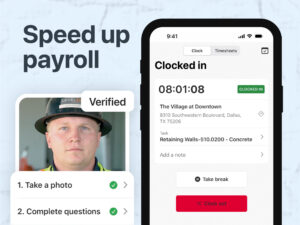
Raken is a field data capture platform that helps crews produce fast, structured daily reports, time tracking and safety records from the jobsite to the office.
Who it’s really for: Crews that need fast, structured daily reports, photos, time and safety records from the field to the office.
Key features:
- Digital daily reports with photos, weather and notes.
- Time-worked and production tracking.
- Safety and quality via checklists, toolbox talks and incident reports.
- Works offline and syncs automatically once back online.
Pricing: Raken no longer publishes prices; you request a quote, a step back from its earlier per-user pricing. A free trial is still available.
Free trial / collaborators: Free trial available; per-user after that.
| Pros | Cons |
| Best-in-class daily reporting | Pricing gated behind a quote |
| Very easy for field crews to use | Intentionally narrow, no estimating, deep scheduling or full financials |
| Strong safety workflows |
What users say: Reviewers rate it highly for ease of use and reporting; the honest limitation, echoed by users, is that it’s a field-reporting specialist rather than an all-in-one.
Verdict: Daily reports and field data capture, paired with a broader PM/financials tool.
8. Contractor Foreman: best budget all-in-one for small GCs
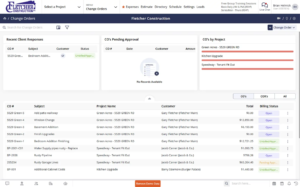
Contractor Foreman is a budget-friendly all-in-one construction management suite that brings estimating, scheduling, job costing and daily logs together for small and mid-sized contractors.
Who it’s really for: Small-to-mid GCs and trades who want estimating, scheduling, job costing and daily logs in one place without an enterprise price tag.
Key features:
- Estimates from a cost-item database, plus Gantt-chart scheduling.
- Job costing, invoicing, and time tracking.
- Daily logs, RFIs, submittals, and documents.
- More than 35 features across the life of a project.
Pricing: One of the most affordable full suites, from $49/mo billed yearly. Pricing is transparent and you can try it free.
Free trial / collaborators: Free trial available.
| Pros | Cons |
| Huge feature set for the price | Breadth over polish, some parts feel less refined |
| Transparent pricing | Learning curve because it does so much |
| Genuine all-in-one for small firms | Mobile app less polished than field-first apps |
What users say: On Reddit it’s repeatedly named for small/medium contractors; fans highlight the support, training and AI knowledge-base assistant.
Verdict: Budget-conscious small GCs who want one system instead of five subscriptions.
9. JobTread: best for residential & remodel builders
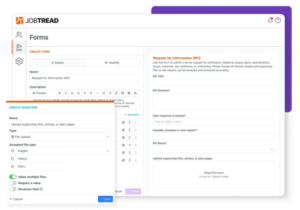
JobTread is a construction management platform that combines budget-first estimating, scheduling and client management in one place for residential and remodel builders.
Who it’s really for: Residential builders, remodelers and specialty contractors (roughly 1–15 internal users) who want estimating, budgeting and client management in one place.
Key features:
- Estimates, proposals and change orders built around your budget.
- Scheduling, daily logs, tasks and document management.
- A construction CRM, e-signatures and a client portal.
Pricing: $159/mo on the annual plan (or $199/mo monthly), including one internal user. Extra internal users $16/mo (annual) or $20/mo (monthly), cheaper past 10 users. Field crew, vendors and customers are free.
Free trial / collaborators: Demo only (no free trial). Subcontractors, vendors and customers are free and unlimited.
| Pros | Cons |
| Excellent value, clear flat-rate pricing | Accounting sync limited to QuickBooks |
| Free access for field users | Not built for commercial/enterprise complexity |
| Strong onboarding & migration support |
What users say: It’s the name that keeps surfacing when contractors say Buildertrend “priced them out”, and reviewers repeatedly cite the migration support and value.
Verdict: Small residential/remodel builders who found Buildertrend expensive or Procore overwhelming.
10. Oracle Aconex: best for large & infrastructure document control
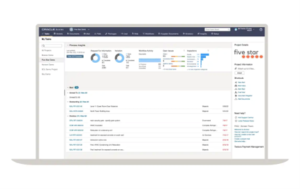
Oracle Aconex is an enterprise document management and project controls platform built to be a neutral single source of truth for documents and correspondence on large and infrastructure projects.
Who it’s really for: Owners, delivery teams and large/infrastructure projects that need a rock-solid, neutral single source of truth for documents and correspondence.
Key features:
- Enterprise-level document management with a defensible record for disputes.
- Correspondence, workflows, tenders and contracts.
- Model coordination and field-work management.
- Meets the highest international security standards.
Pricing: Contact sales for a price, and there’s no free trial, expect enterprise-level costs.
Free trial / collaborators: No free trial.
| Pros | Cons |
| Unmatched document control at scale | Pricing gated; no trial |
| Defensible audit trail | Built for large enterprises, overkill for smaller firms |
| Neutral platform trusted by all parties | Rigid folder structure with a learning curve |
What users say: Reviewers praise information management and the audit trail; the recurring critique is organizational rigidity and setup complexity.
Verdict: Large and infrastructure projects where tight document control and the ability to prove what happened matter most.
11. Knowify: best for trade contractors & job costing
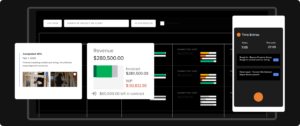
Knowify is a job costing and project management platform for trade and specialty contractors, built to sync tightly with QuickBooks.
Who it’s really for: Trade and specialty contractors who live and die by job costing and need it tied tightly to QuickBooks.
Key features:
- Tracks job costs and compares budget to actual spending in real time.
- Contracts and change orders, with AIA-style and progress billing.
- Scheduling and time tracking.
- Two-way sync with QuickBooks.
Pricing: From $99/mo for the Core plan (one user), plus $29/mo per additional user. Pricing is published openly and you can try it free.
Free trial / collaborators: 14-day free trial.
| Pros | Cons |
| Strong contractor-specific job costing | Built around QuickBooks, less useful without it |
| Excellent two-way QuickBooks sync | Fewer field/plan features than jobsite tools |
| Quick to set up | Suited for smaller subs over than large GCs |
What users say: Reviewers highlight ease of setup and the QuickBooks connection as the main reasons they chose it over heavier platforms.
Verdict: Subcontractors and trade contractors who need job costing that reconciles with their books.
12. Houzz Pro: best for residential firms that sell on client experience
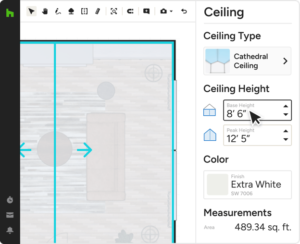
Houzz Pro is a business management platform for residential contractors and designers that combines Houzz-marketplace lead generation, client-facing proposals and a CRM.
Who it’s really for: Remodelers, designers and residential contractors who win work on presentation and client relationships.
Key features:
- Lead generation through the Houzz marketplace.
- Client-facing proposals, mood boards and 3D visuals.
- A CRM, invoicing and basic project management.
- Takeoffs and estimates.
Pricing: Doesn’t publish prices, Essential, Custom and Enterprise plans are all quote-based. A 30-day free trial is available on the entry plan.
Free trial / collaborators: 30-day free trial on the entry plan. Subcontractors and clients get free link-based access.
| Pros | Cons |
| Unique built-in lead generation | Light on jobsite workflows and detailed financials |
| Polished proposals & visuals that impress clients | Best value only if you use the Houzz marketplace |
| Strong CRM | Basic PM compared to specialist tools |
| Higher tiers gated |
What users say: Reviewers value the client-facing polish and lead flow; the common critique is that PM and cost features are thinner than specialist tools.
Verdict: Residential/remodel firms whose edge is client experience and marketing.
13. monday.com: best flexible/general PM for lighter teams
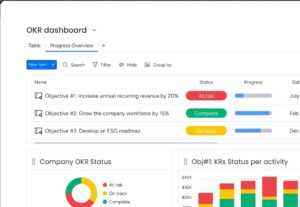
monday.com is a flexible, general-purpose work management platform that construction teams can configure to track bids, RFIs, tasks and change orders, rather than buy a purpose-built system.
Who it’s really for: Teams that want a highly customizable, general-purpose work platform and are willing to build their own construction workflow, not buy one off the shelf.
Key features:
- Flexible boards, timelines and Gantt-chart views.
- Higher tiers add automations and 200+ integrations.
- Dashboards and unlimited free viewers.
- Can be set up to track bids, RFIs and change orders.
Pricing: Free plan for up to two people. Paid plans (billed yearly, min three seats) from $9/seat/mo (Basic), $12 (Standard), $19+ (Pro).
Free trial / collaborators: Free plan (up to 2 users), plus a free trial. Free view-only viewers and guests on higher tiers.
| Pros | Cons |
| Genuinely free plan | Not built for construction, no retention, progress billing or committed-cost tracking |
| Extremely flexible | You essentially build your own system |
| Polished interface | General PM tools are often awkward on the jobsite |
| Cheap to start with |
What users say: On Reddit, one contractor’s blunt warning is that general tools like monday and ClickUp can be “very annoying or impossible to work with” for contractors, though others use it happily for bid and task tracking.
Verdict: Lighter/general project management or a cheap starting point, not a purpose-built construction system.
14. Archdesk: best ERP-style platform for the UK/EU market
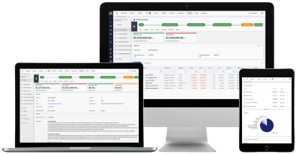
Archdesk is an ERP-style construction management platform that unifies project management, financials and operations in one system for growing UK and EU contractors.
Who it’s really for: Growing UK/EU contractors who want project management, financials and operations in one ERP-style platform.
Key features:
- Budgeting, procurement, valuations and invoicing.
- Scheduling, RFIs and documents.
- Operations: suppliers and subcontractors, timesheets and equipment.
- Modular and customizable, with API and BIM 360 connections.
Pricing: Pricing is custom and isn’t published anywhere.
Free trial / collaborators: No free trial. Subcontractors, clients and consultants are free; you pay only for office and field users.
| Pros | Cons |
| Enterprise-level breadth without legacy baggage | Pricing gated; no trial |
| Modular; fits firms outgrowing single-purpose tools | Setup takes more work |
| Fits UK and EU workflows well | Limited independent reviews |
| More than smaller firms typically need |
What users say: Reviewers praise the all-in-one control and responsive support; the trade-off, as with any ERP, is configuration effort up front.
Verdict: UK/EU contractors who want financials and operations unified in one ERP-style system.
15. Jobber: best for service & trade field-service contractors
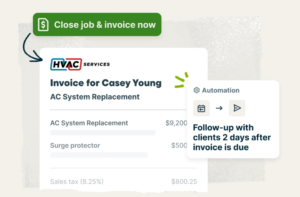
Jobber is a field-service management platform that handles scheduling, dispatch, quoting and invoicing for home-service and trade contractors running service calls.
Who it’s really for: Home-service and trade contractors (HVAC, plumbing, electrical, landscaping) who run service calls, not multi-year builds.
Key features:
- Scheduling, dispatch and routing for technicians.
- Quoting, invoicing and online payments.
- A client CRM with automated reminders.
- QuickBooks connection.
Pricing: Core plan lists at $49/mo, or $29/mo prepaid annually. Scales to ~$499/mo (Plus, one user). No permanent free plan, but a free trial, and pricing is refreshingly transparent.
Free trial / collaborators: Free trial (no permanent free plan). The client hub is free for customers.
| Pros | Cons |
| Transparent, affordable pricing | Built for service work, not construction PM, no RFIs, submittals or committed-cost tracking |
| Excellent, highly-rated mobile app | Add-on costs add up |
| Fast to set up | Steep jump from Core to higher tiers |
| Strong support |
What users say: Reviewers report large admin time savings and rate the mobile experience above heavier field-service rivals.
Verdict: Service and trade contractors running dispatch-based work.
How to choose the best construction management platform for your project
“Best” isn’t the biggest platform. It’s the best fit for your size, project type and the workflows you actually live in. A five-minute framework:
1. Start with your bottleneck, not the feature list. Match the tool to the problem you’re actually trying to fix:
- If you are losing margins on the job, meaning you can’t see committed costs versus what you’ve actually spent, the budget is slipping, or billing and subcontractors are running ahead of the work, you need strong financial platforms: Procore, Knowify, or Archdesk.
- If the jobsite is the problem, meaning defects, inspections, plan versions, or proving what got done and when, you need field-first platforms: PlanRadar, Fieldwire, or Raken.
- If client experience is what matters, meaning presentation, portals, and communication win you the job, you need client-facing platforms: Buildertrend, JobTread, or Houzz Pro.
2. Match the tool to your company type.
- Field documentation, inspections and reporting (any company type) → PlanRadar
- Enterprise GC → Procore or Autodesk
- Small GC → Contractor Foreman
- Residential → Buildertrend or JobTread
- Subcontractor → Knowify.
- Service/trade → Jobber
- Infrastructure → Aconex
3. Test if your team will actually adopt the tool before you buy, not after:
- Start with a free trial and ask the people who will actually use it, your foreman, the crew, and the office to test it out.
- Check whether the tool fits the way you already work, or expects you to change everything to suit it. The good ones let you keep your own defect categories, report formats and naming. The ones that get dropped force you to rebuild your whole process around them, and that is usually where adoption falls apart
- Get them to log defects, photos and a daily report from their own phones on site for a week, then watch what happens.
- Did they keep using it without you chasing them?
- Could they use it on site without sitting through a training session?
- If the crew works around it during a free trial, they’ll work around it once you have signed up for a paid version.
4. Treat “contact sales” as a negative, but don’t let it put you off. Get the real cost early, and ask three plain questions:
- What is the all-in price for my size today?
- What makes that number go up, and how much can it rise at renewal?
- Can I get it in writing, with any setup or onboarding fees included.
The first quote is usually negotiable, so it’s a starting point, not the final word. A vendor who won’t give you a straight figure has told you something worth knowing.
Most firms end up with a stack: one system for financials, one for the field. That’s normal, and often smarter than forcing one tool to do everything mediocrely.
The bottom line
The honest answer to “what’s the best construction management software?” is another question: best for what, and for whom? Procore wins enterprise, Buildertrend and JobTread win residential, Contractor Foreman wins value, Autodesk wins BIM, Jobber wins service work. The right choice is the one that fixes your actual bottleneck and that your team will open every day.
If that bottleneck is on the jobsite (defects, inspections, plan versions, and proving what happened, when), that’s the lane PlanRadar is built for. It won’t run your financials, and we won’t pretend it does. But for field documentation and site inspection, with a 30-day free trial and pricing you can see before you talk to anyone, it’s worth a look.
Frequently asked questions
What is the best construction management software?
There’s no single winner. It depends on your size and workflows. For large general contractors, Procore is the most complete all-in-one. Small GCs get the best value from Contractor Foreman; residential builders from Buildertrend or JobTread; and teams focused on field documentation and reporting from PlanRadar. Match the tool to your bottleneck rather than chasing the biggest name.
Is there free construction management software?
Genuinely free options are rare. Fieldwire offers a real free tier for small crews (plans, tasks, punch lists), and monday.com has a free plan for up to two users, though it isn’t construction-specific. PlanRadar doesn’t have a free tier, but it gives unlimited subcontractor and watcher accounts free on every plan, and a 30-day free trial to test it before you commit. Most other tools offer a free trial rather than a free tier, which is useful for testing, but you’ll pay to run production work.
What’s the best construction management software for small businesses?
Contractor Foreman is the standout for small GCs: a full estimating/scheduling/job-costing suite from $49/mo with transparent pricing. Small residential builders should look at JobTread ($159/mo flat, free field crews), and subcontractors at Knowify for QuickBooks-based job costing. All three publish their prices, worth prioritizing when budgets are tight.
What do contractors actually use?
Real threads on r/ConstructionManagers are the most honest source here. Across the “software recommendations” and “Procore alternative” discussions, a few patterns repeat: Procore is the default benchmark, and one contractor simply says “Procore is the best hands down.” But it’s widely seen as overkill for smaller work; several GCs note it’s “built for the $10M+ crowd.” Buildertrend and Fieldwire are the most-named alternatives, with a common rule of thumb that “Buildertrend is made for home builders. Procore is made for big GC’s.” And switching inertia is real. A year after asking for alternatives, one poster admitted: “Still in ProCore. The move was too scary.” The takeaway: contractors buy the tool their team will actually use, and many run spreadsheets far longer than any vendor admits.
How much does construction management software cost?
Expect to pay roughly $30 to $150 per user per month for tools built for small and mid-sized businesses. Enterprise platforms like Procore cost more, commonly running tens of thousands of dollars a year, since they price based on how much construction volume you run rather than how many people use the software. Flat-rate, unlimited-user pricing, like Buildertrend and JobTread use, can work out cheaper for big teams but more expensive for solo operators. Watch for setup fees, paid add-ons, and yearly renewal price increases, since the advertised price rarely covers everything you’ll actually pay.
What’s the best software for subcontractors?
Knowify is the strongest pick for subs, because it nails job costing, progress/AIA billing and two-way QuickBooks sync, the financial piece where spreadsheets break first. For field coordination specifically, PlanRadar gives subcontractors and watchers free accounts, so you can loop in your whole crew without paying per seat. Many subs run one of each: a costing tool and a field tool.


