
TL;DR
- Field management software is built for the point of work: fast mobile capture, offline access, and evidence-grade records. That’s a different job from office-first project management (budgets, schedules, contracts), so know which one you’re actually buying.
- The market splits into three: office-first suites (strong on financials, thin field apps), field-native tools (win on site adoption, usually need a separate tool for financials), and point solutions (cheap, but stitching several together recreates the scattered-data problem).
- Start with your own workflows, not a feature list. Map where information gets stuck, name who will actually use the tool (project manager, superintendent, subcontractors), and be honest about your sites.
- The features that decide it on site: fast online/offline capture, live plan version control, standardized inspections, photo and video with a time-stamped audit trail, the field side of RFIs, submittals and change orders, client-ready reporting, real integrations, and above all ease of adoption.
- Run a structured selection: build a weighted scorecard, bring field-specific demo questions, insist on scenario-based demos and a live pilot, and watch the red flags (office tools rebadged for the field, per-seat pricing that punishes subs, no genuine offline mode, no real audit trail, hidden fees).
- Adoption is the real test. If the crew won’t use it on a live job, the feature list doesn’t matter.
Construction runs on what happens in the field. The software has to work there too, in a basement with no signal, on a scaffold, in the hands of a superintendent juggling a dozen things before lunch. Field management software is built for exactly that. At its best it gives crews a quick way to digitally document, communicate, and report work from any device, and it turns the day’s activity into a clear, time-stamped record the office and the client can rely on. At its worst, it leaves the crew confused with overloaded features and it turns into another expensive logo in your tech stack that sits idle until the next renewal period.
In 2026, the market is saturated with office tools repackaged for the field. Being able to identify which platform is built with actual field processes in mind will increase adoption while ensuring your budget is well spent. This guide walks through how to evaluate field management software the way a buyer should: start with your own workflows, judge the features that decide adoption on site, run a structured selection process, and use a few practical tools that most vendor guides leave out, including a weighted scorecard, the questions to ask on a demo, and the red flags that help identify office software masquerading as a field tool.
What construction field management software is and how it differs from project management
Field management software is what your on-site teams use to capture, track, and report the work as it happens. Think daily logs and site diaries, inspections, punch lists, visual evidence, plan access, and the field side of RFIs, submittals, and change orders. All of it feeds one time-stamped record that the office, the client, and the next crew can trust.
There is overlap with construction project management software, but the two are built for different jobs, and it pays to know which one you are actually buying. Project management platforms are built for the desk: budgets, schedules, financials, contract administration. Field management is built for the point of work, where what counts is fast capture on a phone, access that survives a dead signal, and a record solid enough to hold up months later. Plenty of buyers buy an office-first platform, hand it to the field, and watch the crew quietly go back to paper. So ask one question of any product: was the field experience built in from the start or bolted on afterward?
The three kinds of tools you will compare
Before you weigh features, it helps to know the shape of the market, because “construction software” covers three fairly different kinds of product.
Office-first management suites were built in the back office, around budgets, schedules, and contract administration, and added field apps later. They are strong on financials and project controls, and the mobile side is usually the newer, thinner part where field adoption often falls apart.
Field-native tools were built for the site first: fast mobile capture, offline access, plans, inspections, and punch lists, with office reporting layered on top. They tend to win on adoption with crews and subcontractors but require an additional tool to manage financials.
Point solutions were built to do one thing well and nothing else. A daily-log app, a punch-list app, a photo tool. They are cheap to start with, but stitch several together and you’ve recreated the scattered-data problem you were trying to fix.
Most buyers are really choosing between the first two, with point solutions filling gaps. Knowing which camp a product comes from tells you where its strengths and blind spots are likely to sit before you book a single demo.
How field management is changing in 2026
Construction has trailed other industries on productivity for years, held back in part by slow digitization. The industry is still early in its digital shift: in KPMG’s 2025/2026 Global Construction Survey, fewer than half of the construction leaders surveyed rated their organization as digitally mature, and only 10% called themselves cutting-edge. Getting the right tools into the field is a big part of closing that gap.
Consolidation leads the charge. Teams are tired of keeping the daily log in one app, inspections in another, and RFIs buried in email, so they want all of it in a single place, working off the same plans and the same photos. Most sites are a long way from that, and the gap costs them. In PlanRadar’s Construction Survey Report 2026: Managing Project Changes in the Age of AI, nearly 8 in 10 respondents report that at least half their documentation lives across unconsolidated channels such as email, texts, and calls. When a dispute or a claim lands, that scattered history is what someone has to piece back together under pressure.
Routine work is getting automated too. Recurring inspections, scheduled maintenance checks, and report templates that used to be paid extras now come as standard, and they save crews from typing the same information into the same form week after week.
AI is the newest arrival, and the one to treat with the most skepticism. Adoption is still early: in RICS’s 2025 survey of more than 2,200 professionals worldwide, around 45% reported no AI use in their organization, and only a small fraction had it running across multiple processes. Where it actually helps is digging the right detail out of a mountain of project data the moment someone needs it, like checking whether a contract clause covers a change before anyone raises it. Vendors will claim plenty more, so make them prove it on your own data, not a canned example.
Start by assessing your own field workflows
Rollouts often fail for the same reason: the buyer went shopping before they understood their own process. Do that internal work first and everything after it gets easier.
Start by mapping how work actually moves on your sites. Take one recent project and trace it from the first daily log to closeout, marking every place information got stuck: the punch list stranded on someone’s phone, the RFI that sat in an inbox for a week, the change order nobody could tie back to the clause that caused it. Those sticking points are your real requirements, and they beat any generic feature list.
Then name the people who will touch the tool. For a typical US general contractor that is the project manager, who runs scheduling, budgeting, and cost control mostly from the office; the superintendent, who coordinates the site and is the first call for every subcontractor; and the subcontractors, who often have less patience for clunky tools. A tool the PM loves and the crew ignores will not last a week on a live job.
Finally, be honest about your projects and your sites. A homebuilder running finish and rough punches across dozens of homes needs something different from a commercial contractor pushing submittals and RFIs on one big multi-unit build. Spotty connectivity, several jobs at once, a lot of subcontractors: each of these pushes different features up your list, which is what the scorecard further down is for. Keep these three in front of you: your sticking points, your people, your site conditions. They’re the inputs you’ll score against later.
What to look for in a field tool
Every vendor guide has a feature list. This one is the shortlist that actually decides whether a tool works on a real site, written in terms of what each feature does for the people using it. Weigh each against the workflows you just mapped.
Fast, reliable capture on mobile, online or offline
The field lives on phones and tablets, often in places with no bars. Capture has to be fast enough that a superintendent will use it mid-task, and it has to keep working offline and sync later. Make it slow, or make it depend on signal, and the crew falls back to memory and a notepad. The record is never complete after that.
Plan access and version control
Building from an old drawing is one of the costliest mistakes on any job. The tool should push the latest plan version to everyone the moment it changes, let crews find work by pinning issues on the plan itself, and keep the old versions on file. Build from the wrong version and the wall goes up on outdated information that the crew ends up tearing down.
Standardized data capture and inspections
Quality comes from capturing the same things the same way every time. Predefined fields, reusable inspection and checklist templates, and mandatory fields all cut the variation that turns into rework. The cost of getting this wrong shows up in the numbers: in PlanRadar’s Construction QA/QC Impact Report 2025, more than 8 in 10 companies say rework or delays from poor quality control affect their projects on a recurring basis, and 77% of respondents report inconsistent QA/QC documentation either lacking a set standard or varying across teams and subcontractors. Standardizing capture on site is what closes that gap.
Photo, video, and a time-stamped audit trail
Field evidence is what wins claims and closes projects out. Look for quick photo and video capture tied to the exact task or spot, and an audit trail that logs who did what and when. When someone questions who owns a delay or a defect, that record is the line between recovering a cost and eating it.
The field side of RFIs, submittals, and change orders
A field tool should let a sub or a site engineer raise an RFI with the full context and references attached, route submittals through review and approval before anything gets ordered, and link a change order back to the RFI that set it off, each with a sequence number and a locked record once it clears. That traceability is what protects you when a change is questioned later. The workflow section below shows the chain running end to end.
Reporting that produces client-ready output
Nearly every buyer’s guide names reporting as a priority, and almost none makes it real. Good reporting means standard capture, photo and media evidence, a time-stamped trail, one-click exports in a format the client will accept, and templates you can shape to your own requirements. If a report still takes hours to build after every site visit, the tool is making work, not saving it.
Integration with the systems you already run
Field software rarely stands on its own. Check that it talks to your document management, scheduling, accounting, or ERP so data moves without anyone rekeying it. And press on the how and the cost, because “compatible” often turns out to mean “possible, with custom development.”
Ease of adoption
None of the above counts if the field will not use it, so treat ease of use as a hard requirement, not a nice extra. The test is simple: hand the app to a superintendent or a sub during evaluation and watch, rather than sitting through a polished demo.
What good field workflows look like
Features stay abstract until you see them run. The four workflows below are the ones that turn up on most commercial jobs, and they are the truest test of a field tool. Watch how each one behaves in a demo, because that shows you more than any feature list can.
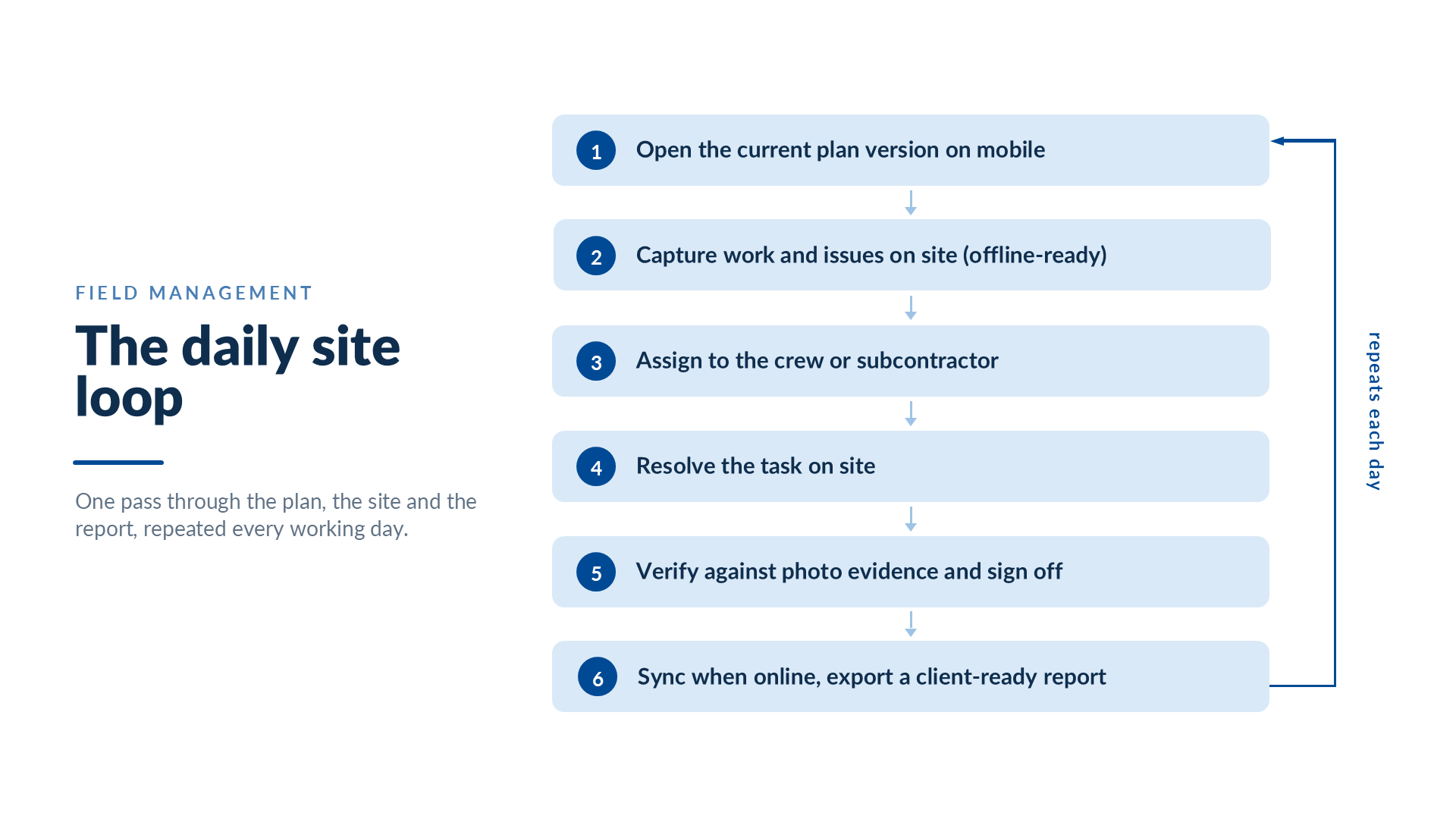
Field work: the daily site loop
This is the everyday rhythm of the site, the loop a superintendent runs on every project.
The crew opens the current plan on a phone or tablet, so nobody is building from last month’s drawing. They capture work and issues on the spot, into standardized fields with photos attached, and the app keeps going with no signal. Each item goes to the crew or sub responsible, with a due date, gets tracked to done, and is checked against the evidence before anyone signs it off. It all syncs once the device is back online, and the client-ready report exports straight from what was captured. The record writes itself as the work happens, so nothing has to be reconstructed from memory later.
QA/QC: from approved standard to signed-off quality
Quality assurance sets out how quality will be achieved; quality control proves on site that it was. A good field tool ties the two together, so the checklist actually verifies the work against the approved drawing, spec, or material approval instead of just ticking a box.
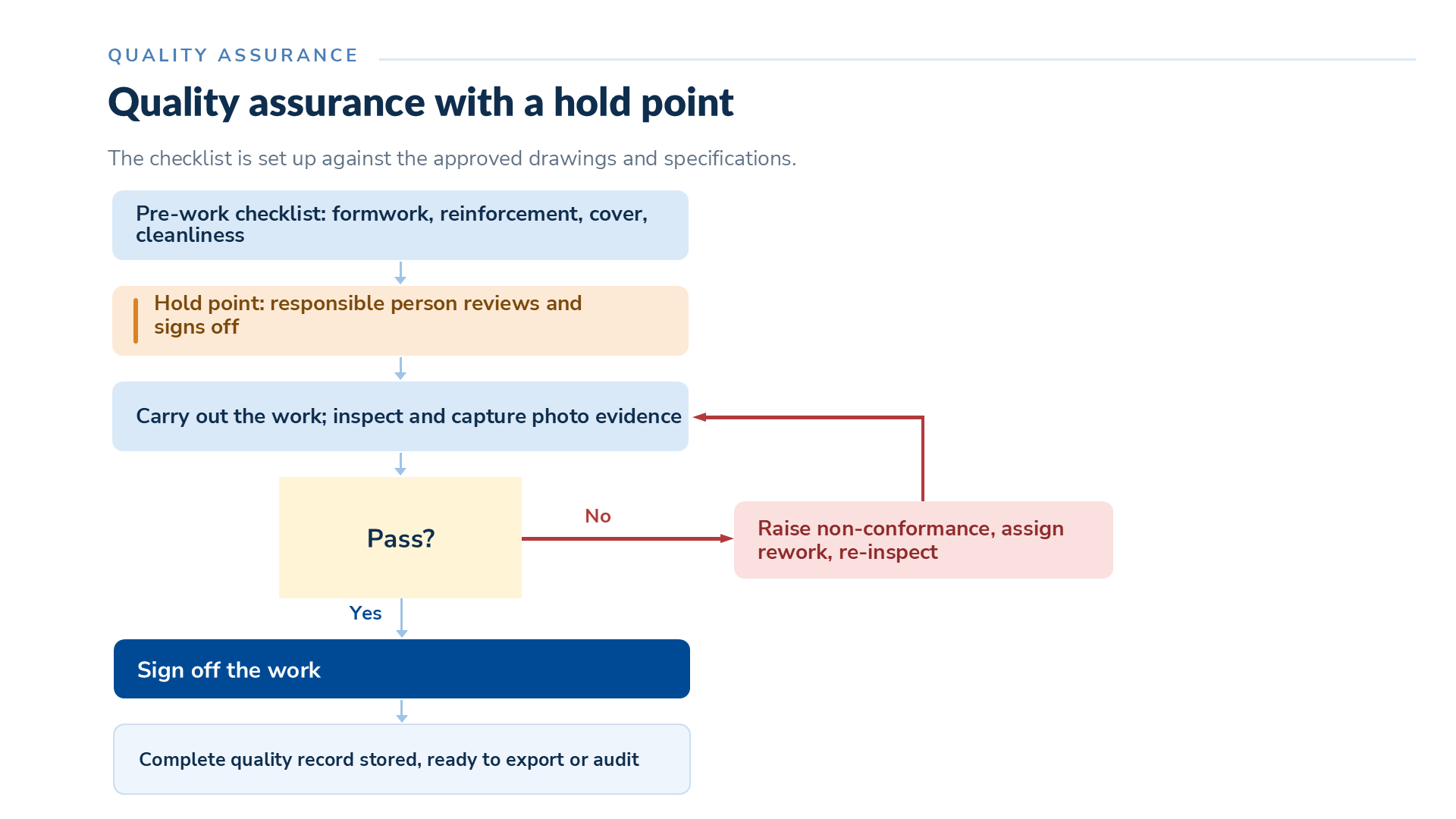
Take a concrete pour. The checklist is built against the approved drawings and specs. Before the pour, the pre-pour checks cover formwork, reinforcement, cover, and cleanliness, and they act as a hold point: nothing gets poured until the responsible person has reviewed and signed off. During and after, the team checks delivery, slump, compaction, curing, and the finished surface, with photos at each stage. Anything that fails becomes a non-conformance, gets assigned for rework, and comes back for re-inspection. Once it all passes, the work is signed off and the full quality record is filed, ready to export or audit at any time. That consistency tends to pay off on the bottom line: in PlanRadar’s Construction QA/QC Impact Report 2025, nearly 2 in 3 companies with consistent QA/QC processes keep rework costs under 5% of budget versus just over 1 in 3 without standards.
RFIs and submittals: the project-control chain
RFIs, submittals, and change orders are where field and office meet, and where money is won or lost. Each one is a role-based approval flow with a traceable, numbered record, and they tend to feed into each other.
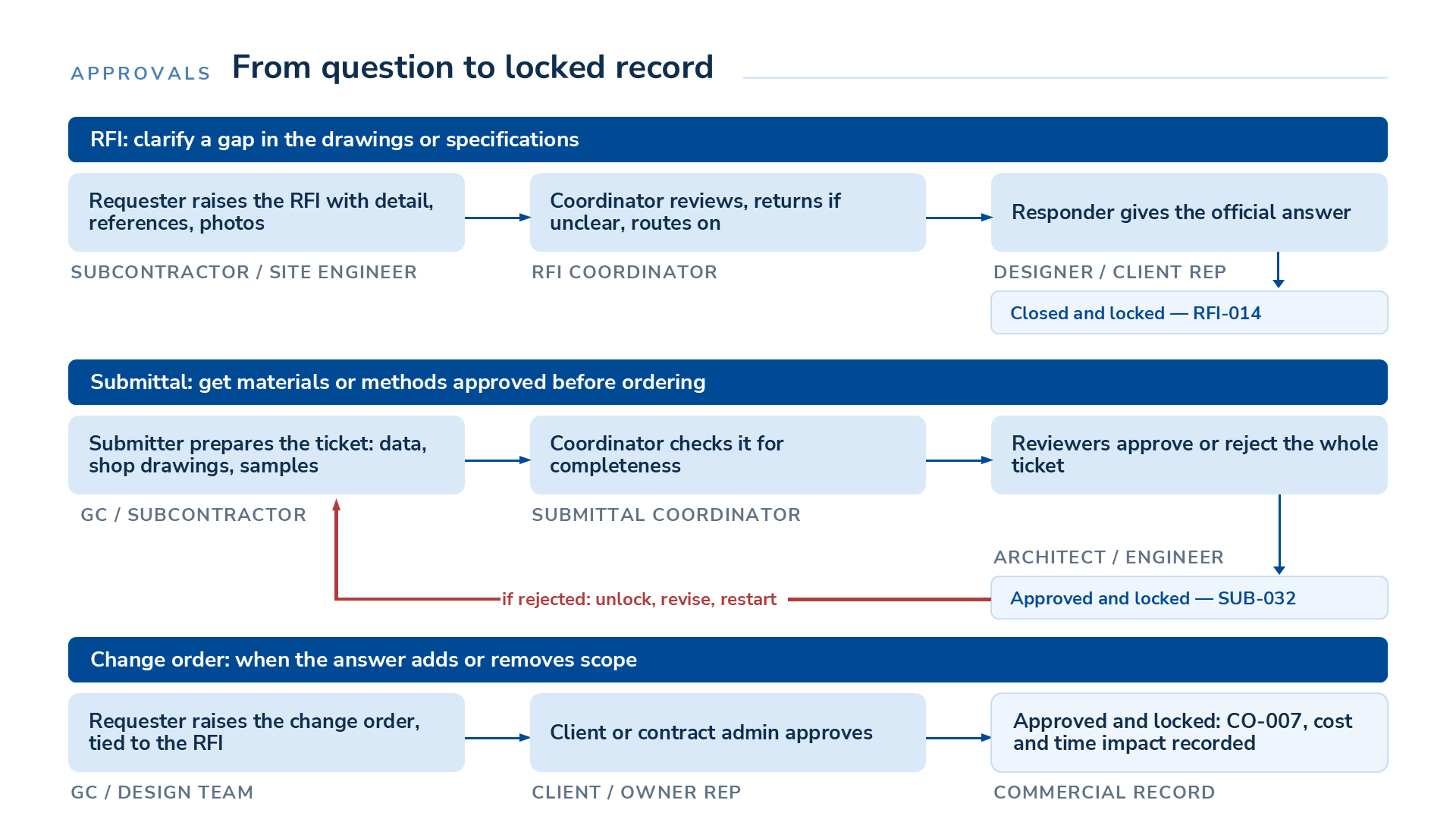
An RFI kicks off when a sub or site engineer hits a gap in a drawing or spec. They raise it with the detail, references, and photos, and flag any hit to cost, time, or safety. A coordinator checks it is clear, bounces it back if it is not, and sends it to the responder, usually the designer or a client rep, for an official answer. The coordinator confirms that answer and closes the RFI, which locks the record under a number like RFI-014.
A submittal runs a similar chain before anything is ordered. The submitter builds the ticket with the material data, shop drawings, method statement, or samples; a submittal coordinator checks it is complete; then it goes to the reviewers, usually the architect or engineer, who approve or reject the whole ticket. The moment it’s sent for approval, it’s locked, and a rejection sends it back to the coordinator to unlock, revise, and restart.
When an answer or a site condition changes the scope, the GC or design team raises a change order tied back to that RFI, records the cost and time impact, and locks it once the client signs off. The value across all three is traceability: every clarification and every approved change becomes part of a record no one can dispute later.
Visual site records: 360° capture
Photos and notes prove a lot, but they only show what someone thought to aim the camera at. A 360° capture records the whole space, and that is what makes it worth so much when a question surfaces months later.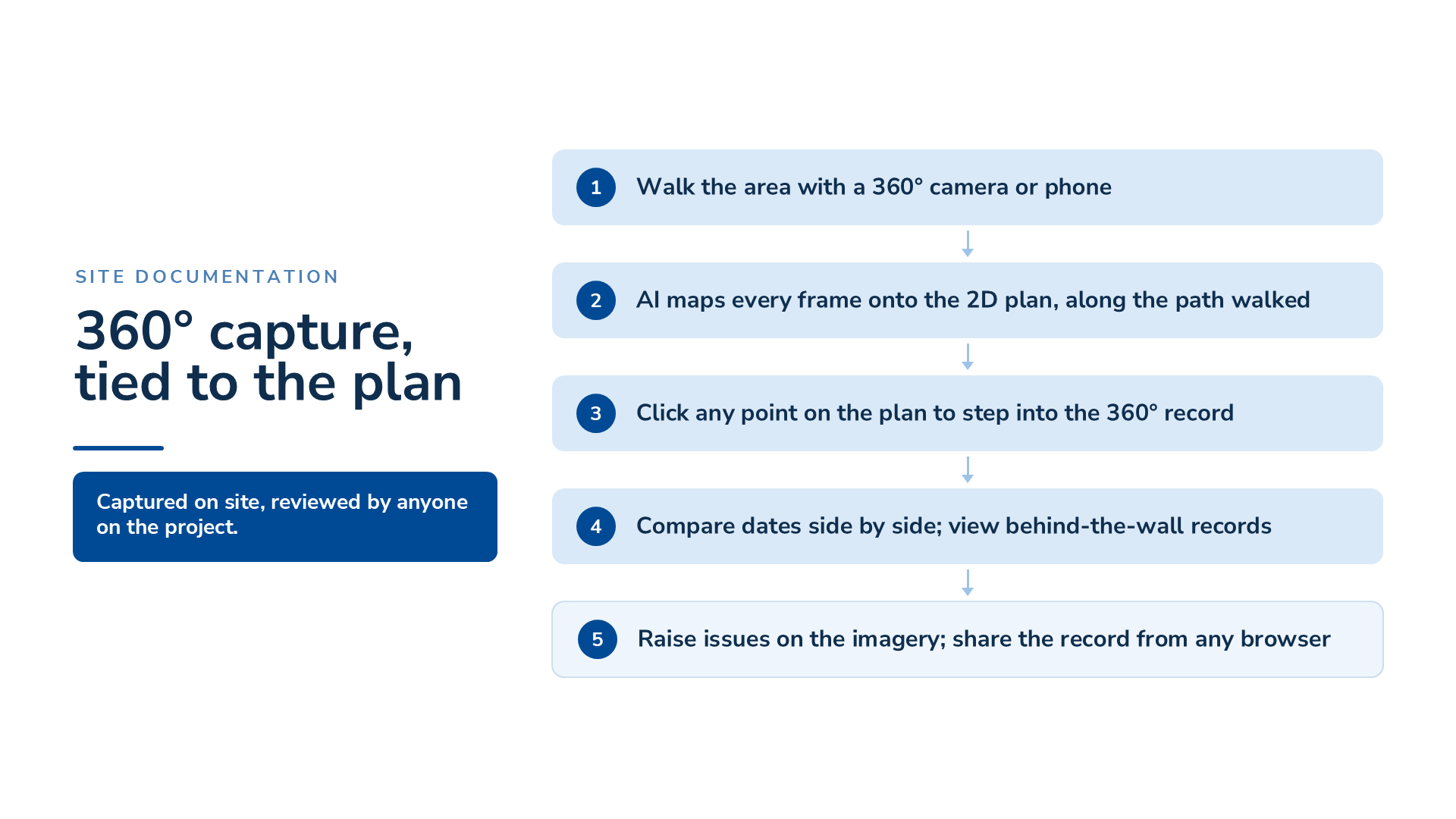
Someone on the site team walks the area with a 360° camera or a phone, and AI maps every frame onto the 2D plan along the route they walked, so nobody tags anything by hand. After that, anyone on the project can click a spot on the plan and step into the 360° view from that exact point, in a browser, without a trip back to the site. Put two visits side by side and you can see precisely what was in a given place on a given date. Beyond that, a walk done before the surfaces close leaves a permanent behind-the-wall record of what went in. Issues get raised straight off the imagery. Records like this cut down field visits for reviews and provide evidence for a claim or a payment application that is hard to argue with. Not every platform offers it, and where it exists it is usually a paid add-on, so treat it as a bonus rather than a baseline requirement.
A step-by-step process for choosing
Once you know your workflows and what to look for, run a structured selection instead of reacting to whichever demo dazzled you most.
- Document your current field workflows and where they break down. This is the assessment above. Take it into every vendor conversation.
- Assemble a cross-functional group. Include the field. A superintendent and a sub will catch adoption problems a project manager never will.
- Define must-have features and build a weighted scorecard. Split the essentials from the nice-to-haves, and set the weights before you see a single demo, so the demo does not set your priorities for you.
- Shortlist and compare options side by side. Look at features, fit for your project types, and total cost, including implementation and any per-seat charge for subcontractors.
- Run scenario-based demos and request trials. Hand every vendor the same real scenario from your own project and watch them run it. Get a trial so the field can try the app on a live task.
- Check references and talk to peers beyond the vendor’s list. Ask contractors doing work like yours what adoption was really like, and what caught them out after they signed.
- Pilot on a live, mid-execution project. A pilot on real work, not a test project, is the only way to know the crew will use it. Run it long enough to cover a full cycle of your key workflows.
- Plan the full rollout before you sign. Nail down onboarding, training, data migration, and support before the contract, not after.
Questions to ask on a demo
The vendor runs the demo unless you take the wheel. Bring these field-specific questions and make them show each one live, on real data:
- Show me how a defect raised on site becomes a client-ready report, start to finish.
- Show me what happens to my data when there is no signal, and how it syncs when the device comes back online.
- Walk me through an RFI that leads to a change order, with the two tied together.
- Show me how a subcontractor with no license gets involved, and what it costs to add them.
- Show me how the crew always gets the latest plan, and what stops them working from an old one.
- Show me how long it takes a superintendent to file a full daily report on a phone.
- Show me how an inspection template is built and reused across projects.
- Show me where the audit trail lives, and whether it can be edited after the fact.
- Show me how this connects to the systems we already run, and whether that is included or custom.
- Walk me through onboarding for a full field team, and the training that comes with it.
Build a weighted scorecard
The most useful thing in a software decision is a scorecard, and almost no vendor hands you one. List your criteria down the side, then distribute 100 points across them by how much each one counts for your projects. The limit forces a choice, so your must-haves pull weight from the nice-to-haves; on most field jobs, ease of adoption is where the most weight belongs. Score every shortlisted vendor 1 to 5 on each criterion, multiply the score by the weight for each row, and add the rows for that vendor’s weighted total. Set the weights before you see a single demo, keep the sheet open through every demo and trial, and the highest weighted total is your answer on paper. The template below is a starting point; adjust the weights to match the workflows you mapped.
| Criterion | Weight (points total 100) | Vendor A (1 to 5) | Vendor B (1 to 5) | Vendor C (1 to 5) |
| Mobile capture speed and offline mode | ||||
| Plan access and version control | ||||
| Standardized inspections and checklists | ||||
| Photo evidence and audit trail | ||||
| RFIs, submittals, and change orders | ||||
| Client-ready reporting and templates | ||||
| Integration with existing systems | ||||
| Ease of adoption for field crews | ||||
| Subcontractor access and cost | ||||
| Total cost of ownership | ||||
| Implementation and support | ||||
| Weighted total | 100 |
Red flags to watch for
A few warning signs only surface if you go looking.
- An office-first tool rebadged as a field tool. If the mobile app feels like an afterthought and the workflows assume a desk, the field will not adopt it.
- Per-seat pricing that punishes collaboration. Field work runs on subcontractors. Charging for every one of them adds up fast and quietly discourages the collaboration you bought the tool for.
- No genuine offline mode. “Cloud-based” is not the same as “works with no signal.” Confirm it on a device before you buy.
- A clunky mobile experience. Slow capture and too many taps are how good intentions die on a live site.
- No real audit trail. If records can be edited after the fact with no trace, they will not protect you in a dispute.
- Hidden implementation and integration fees. Get the total cost, including onboarding, integrations, and support, in writing.
Rolling it out
Choosing well is half the job. Adoption is the other half, and a few habits decide how well it goes.
Get stakeholders aligned early, so the field, the office, and management agree on why the tool is coming in and what a win looks like. Standardize your workflows and templates before rollout, so everyone captures the same way from day one. Train the field the way they actually work, on their own devices and on real tasks, and lean on the vendor’s onboarding to do it. Start where it hurts most today, prove the tool there, and grow out from the people who already trust it.
How PlanRadar supports field management
PlanRadar is built for the site. It gives field teams a fast, simple way to capture, track, and report work from any device, online or off, and it turns that activity into a complete, time-stamped project record the office and the client can rely on.
Site teams log daily reports, inspections, punch lists, and defects into standardized fields, pinning issues on the current plan so work is easy to find and hard to lose. RFIs, submittals, and change orders run as connected, traceable workflows, with approvals and a locked record once they are signed off. Reports export in a client-ready format in seconds from the data already captured, using templates you shape to your own requirements. Free subcontractor and watcher accounts bring the whole team onto one platform without paying for every seat, and no-code integrations connect PlanRadar to the systems you already run. For teams that want richer site evidence, the SiteView 360° add-on maps a simple helmet-camera walk onto your plans, and its AI answers questions from your own project data, for example whether a contract clause covers a change, instead of making you dig through the documents yourself.
Over 200,000 users across 75+ countries work in PlanRadar, and 75% of customers chose it for ease of use, the one thing that decides whether field software gets used at all.
If you want to see how this runs on a project like yours, book a demo and bring a real scenario from your own site. That is the best way to judge any field tool, this one included.
Frequently asked questions
What is construction field management software?
It is what on-site teams use to capture, track, and report work as it happens: daily logs, inspections, punch lists, defects, photo evidence, plan access, and the field side of RFIs, submittals, and change orders. It turns field activity into a reliable, time-stamped record the whole project can rely on.
How is it different from construction project management software?
Project management software is built for the desk: budgets, schedules, contract administration. Field management software is built for the point of work: fast mobile capture, offline access, and evidence-grade records from the site. A lot of platforms do some of both, so check where the product was designed to be used first.
Does field management software work without internet access?
The good ones do. A real offline mode lets crews capture with no signal and syncs it automatically once the device reconnects. Confirm it on an actual device during evaluation, because “cloud-based” does not guarantee it.
How is field management software usually priced?
Most platforms charge per user, often in tiers by feature set, with add-ons for the extras. The figure that counts is total cost of ownership: licenses, implementation, integrations, support, and whether subcontractor access costs you anything. Ask for all of it in writing before you compare.
Can it integrate with our ERP and accounting systems?
Often yes, through prebuilt connectors or integration tools. Ask exactly which systems are supported, how the connection works, and whether it is included or a custom project.
How long should a pilot last before we decide?
Long enough to cover a full cycle of your most important workflows on a live, mid-execution project. A pilot on real work tells you what a demo cannot: whether the field will actually use it.
What is the best way to roll new software out to field crews?
Get everyone aligned on the why, standardize your workflows and templates first, train crews on their own devices and on real tasks, and start where it hurts most. Use the vendor’s onboarding, and grow out from the people who already trust the tool.
Is field management software suitable for small contractors?
Yes, and smaller teams often gain the most. One organized record replaces the usual mess of texts, emails, photos, and paper that eats time and starts arguments. Look for quick onboarding and simple pricing.|x


